

NovaStar VX400 Pro: Powerful Enough for Your LED Wall?
The NovaStar VX400 Pro is an all-in-one LED display controller. This page covers its specs, features, working modes, pricing, and how it stacks up against the VX600 Pro and VX1000 Pro.
1. What Is the NovaStar VX400 Pro?
The VX400 Pro combines video processing and LED screen control into a single 1U rack unit. No separate video processor. No standalone sending card. One box handles the full signal chain from input to cabinet output.
It supports up to 2.6 million pixels, with a max output of 10,240 × 8,192 pixels. The HDMI 2.0 input takes 4K×2K@60Hz directly, so 4K sources come through clean.
It’s built for mid-to-high-end projects — rental stages, fine-pitch indoor screens, broadcast studios, and commercial installations.
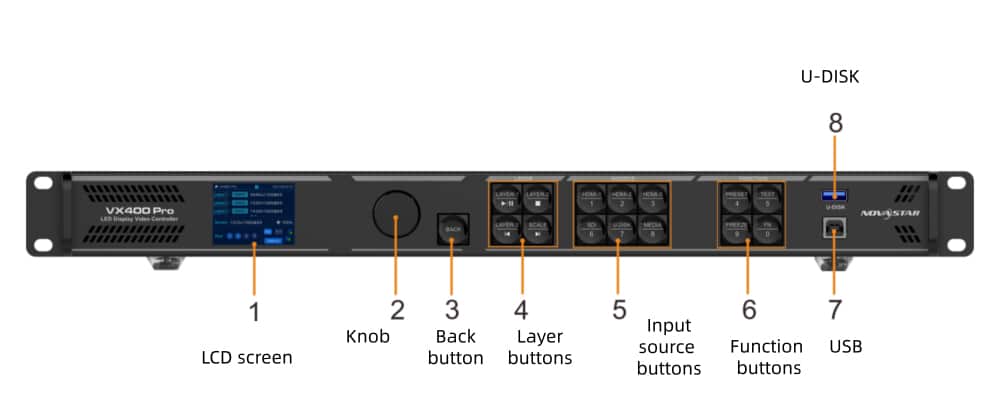
2. Core Specifications ( Inputs & Outputs)
Before getting into features, here’s a quick look at what the VX400 Pro is actually working with.
2.1 Key Numbers
| Max pixel capacity | 2.6 million pixels |
| Max output width | 10,240 px |
| Max output height | 8,192 px |
| Max input resolution | 4096×2160@60Hz |
| Layers | 6 |
| Power consumption | 42W |
| Form factor | 1U rack, 482.6 × 302.2 × 50.1 mm |
| Weight | 3.8 kg |
2.2 Inputs
The VX400 Pro covers most signal sources you’d run into on a real job.
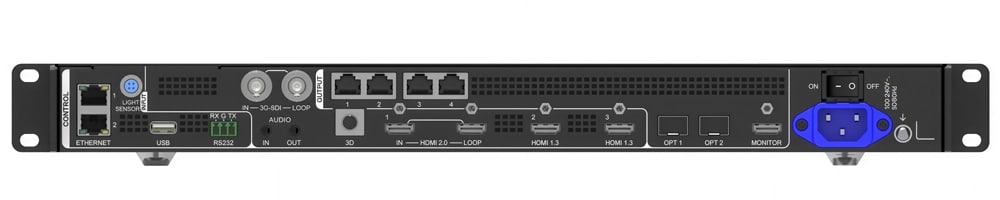
✔ HDMI 2.0 × 1 — up to 4096×2160@60Hz, with loop-out (up to 6 devices in chain)
✔ HDMI 1.3 × 2 — up to 1920×1080@60Hz, good for secondary sources
✔ 3G-SDI × 1 — broadcast standard, with loop-out
✔ OPT 1 × 1 — 10G fiber port, self-adaptive as input or output depending on connection
✔ USB 3.0 × 1 — direct media playback from USB drive
2.3 Outputs
✔ Gigabit Ethernet × 4 — drives LED cabinets directly, 650,000 pixels per port, 2.6M total
✔ OPT 2 × 1 — 10G fiber output, copy or backup mode
✔ HDMI monitor × 1 — fixed 1920×1080@60Hz, for on-site monitoring
✔ 3D connector × 1 — for third-party 3D emitters
2.4 Audio
3.5mm independent input and output, plus embedded audio via HDMI sources.
3. Key Features
The VX400 Pro isn’t just a signal router. Here’s what it actually does on a real job.

3.1 6 Layers, Multiple Sources
The VX400 Pro supports up to 6 layers simultaneously. Each layer can pull from a different input — HDMI, SDI, USB, or fiber. Size, position, and priority are all adjustable per layer. So if you’re running a stage show with a live camera feed, a media server, and a backup source, you can manage all of them on one device.
3.2 Low Latency — Down to 0 Frames
In ByPass mode with low latency enabled, the VX400 Pro drops to 0 frames of delay. In standard Video Controller mode with low latency on, it runs at 1–2 frames. That’s enough for live events, broadcast feeds, and anything where sync between audio and video actually matters.
3.3 USB Playback
Plug in a USB drive and it plays directly — no laptop needed. It supports H.265 4K@60fps, H.264, and common formats like MP4, MKV, and MOV.
3.4 Pixel-Level Calibration
Working with NovaLCT, the VX400 Pro supports brightness and chroma calibration at the individual pixel level. On fine-pitch screens especially, this makes a visible difference — it evens out color consistency across the whole display surface.
3.5 256 Presets
Save up to 256 scene configurations and load any one of them with a single button press. For rental crews or conference AV teams that run the same setups repeatedly, this saves a lot of time on-site.
3.6 OSD Overlay
The VX400 Pro supports on-screen display overlays — static text, scrolling text, time, weather, and image overlays. Each type has its own display limits, but it covers most basic use cases without needing an external graphics system.
3.7 Free Topology
Screen layout isn’t restricted to a rectangle per Ethernet port. Cabinets can be arranged in non-standard shapes, as long as the total pixel load stays within capacity. This requires compatible receiving cards.
3.8 Backup & Recovery
The device supports multiple backup options: input source backup, Ethernet port backup, and device-level backup between two units. If power cuts out unexpectedly, it restores the last saved configuration automatically on reboot.
4. Three Working Modes
The VX400 Pro runs in three different modes. Which one you use depends on your setup — here’s how each one works in practice.

4.1 Video Controller Mode
This is the default mode and the one most installs use. The VX400 Pro handles full video processing and screen control in one unit. It takes in your signal, scales and layers it, then outputs to LED cabinets via Ethernet. OPT 1 in this mode can work as either input or output depending on what’s connected.
Latency sits at 1–2 frames with low latency enabled, or 2–3 frames without. Fine for presentations, digital signage, and most live event setups.
4.2 Fiber Converter Mode
Use this when your screen is far from the control room. In this mode, the VX400 Pro acts as a fiber signal relay — it receives via OPT 1, converts, and distributes to cabinets through Ethernet. With a single-mode fiber module, transmission distance goes up to 10km. Multi-mode covers up to 300m.
Note: the fiber module isn’t included. You purchase and install it separately.
4.3 ByPass Mode
In ByPass mode, the VX400 Pro works as a pure sending card. There’s no video processing — the signal passes straight through to the screen pixel-to-pixel. The result is 0 frames of latency, which makes it the right choice for live camera feeds, broadcast studios, or any situation where real-time response is critical.
The trade-off is that video processing features aren’t available in this mode.
5. Compatible LED Screen Types
The VX400 Pro pairs well with a range of LED screen types. But not every screen gets the same benefit from it — so here’s a straightforward breakdown of what works best together.

5.1 Fine-Pitch Indoor Screens (P1.x – P2.x)
Fine-pitch indoor LED screen is where the VX400 Pro really earns its place. Pixel-level calibration via NovaLCT keeps brightness and color consistent across the whole surface — something that matters a lot at close viewing distances. If you’re running a P1.5 or P2 indoor screen, this controller is a natural fit.
5.2 Rental LED Screens
For LED video wall rentals setups, the combination of 256 presets, ByPass mode, and fiber output covers most on-site demands. You can pre-save scene configurations, cut latency to zero for live feeds, and run long cable runs without signal loss. That’s a practical setup for touring events and short-term installs.
5.3 Ultra-Wide & Non-Standard Screens
The VX400 Pro’s Free Topology feature supports flexible LED display arrangements per Ethernet port. So if your screen has an unusual aspect ratio or irregular shape, it handles that without workarounds — as long as compatible receiving cards are used.
5.4 Stage & Fixed Installation Screens
For fixed stage LED screen installs, the 6-layer support and multi-source input management give you enough flexibility to handle complex show requirements. Combine that with device-level backup and auto configuration restore, and it holds up well in high-stakes environments.
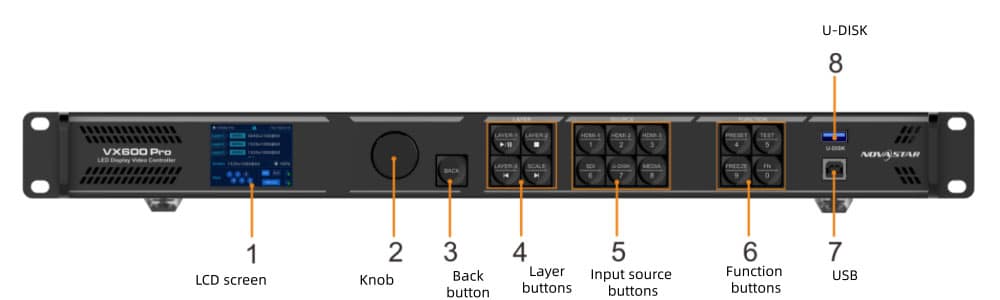
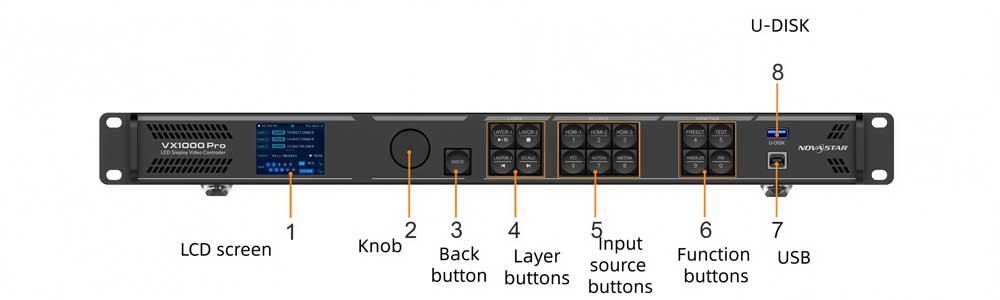
6. VX400 Pro vs VX600 Pro vs VX1000 Pro
If you’re deciding between these three, the good news is they share the same core feature set. All three support 4K×2K@60Hz input, 6 layers, three working modes, 256 presets, USB playback, and pixel-level calibration. The real differences come down to output capacity, Genlock support, and scale.
Here's the full breakdown:
| Features | VX400 Pro | VX600 Pro | VX1000 Pro |
| Ethernet output ports | 4 | 6 | 10 |
| Max pixel capacity | 2.6 million | 3.9 million | 6.5 million |
| Max output resolution | 10,240 × 8,192 | 10,240 × 8,192 | 10,240 × 8,192 |
| HDMI 2.0 input | 1x (4K@60Hz) | 1x (4K@60Hz) | 1x (4K@60Hz) |
| HDMI 1.3 input | 2x | 2x | 2x |
| 3G-SDI input | 1x | 1x | 1x |
| Fiber ports (OPT) | 2x 10G | 2x 10G | 2x 10G |
| Layers | 6 | 6 | 6 |
| Genlock | ✗ | ✓ | ✓ |
| Low latency (ByPass) | 0 frames | 0 frames | 0 frames |
| Low latency (Video Controller) | 1–2 frames | 1–2 frames | 1–2 frames |
| Power consumption | 42W | 43W | 44W |
| Net weight | 3.8 kg | 3.9 kg | 3.9 kg |
So which one do you actually need?
The VX400 Pro covers most mid-sized projects well. At 2.6 million pixels across 4 Ethernet ports, it handles a solid range of fine-pitch indoor screens and rental stage setups without going to overkill. If your total pixel count stays comfortably under that limit, there’s no practical reason to go bigger.
Step up to the VX600 Pro if your screen pushes past 2.6 million pixels, or if Genlock matters for your workflow. Genlock lets you sync the controller’s output to an external reference signal — that’s relevant for broadcast environments or multi-screen setups that need frame-accurate sync with other equipment. The VX400 Pro doesn’t have this.
The VX1000 Pro is the choice for large-scale installations. With 10 Ethernet ports and 6.5 million pixels of capacity, it suits bigger stage builds, high-resolution command centers, or any project where the screen area is simply too large for the VX600 Pro to handle cleanly.
7. NovaStar VX400 Pro Price
The NovaStar VX400 Pro price isn’t fixed — it varies depending on a few factors. Based on current market listings, the VX400 Pro typically falls in the $900–$1000 range.
Region and local distributor margins play a role. So does purchase quantity — a single unit for a fixed install sits at a different price point than a bulk order for a rental fleet. Whether you need the optional remote control, or a fiber module for long-distance transmission, also adds to the total. Neither comes included in the standard package.
If you’re sourcing a screen from LedInCloud – LED Screen Cloud Platform and need the VX400 Pro as the control solution, we can package both together. That often makes more sense than buying the controller separately, since the configuration is set up to match your specific screen from the start.
Contact LedInCloud to get a quote that covers both the screen and the controller.
8. NovaStar VX400 Pro Manual & Datasheet Download
Looking for the official documentation? You can download the latest files on LedInCloud.
✔ VX400 Pro Specifications (Datasheet)
The VX400 Pro works with the following NovaStar software tools. You can find the latest versions on our NovaStar Software download page.
✔ NovaLCT — PC/Mac software for screen configuration, calibration, and firmware updates
✔ Unico — Web-based and client software for device control and monitoring
✔ VICP — Mobile app for iOS and Android, remote control over local network
9. FAQs
How many LED cabinets can the VX400 Pro drive?
It depends on your cabinet resolution. The VX400 Pro supports up to 2.6 million pixels total across 4 Ethernet ports. Each port handles up to 650,000 pixels at 8-bit. To estimate cabinet count, divide your total pixel load by the per-cabinet resolution, then check it stays within those port limits. If you're not sure, send us your screen specs and we'll work it out.
What's the difference between Video Controller mode and ByPass mode?
In Video Controller mode, the VX400 Pro handles full video processing — scaling, layering, color adjustment — before sending to the screen. Latency sits at 1–2 frames with low latency enabled. In ByPass mode, there's no processing. The signal passes straight through pixel-to-pixel, dropping latency to 0 frames. ByPass is the right choice for live camera feeds or broadcast where real-time response matters. The trade-off is that video processing features aren't available in that mode.
Does the VX400 Pro support 4K input?
Yes. The HDMI 2.0 port takes up to 4096×2160@60Hz. The two HDMI 1.3 ports are capped at 1920×1080@60Hz — those work well for secondary sources or backup feeds. The 3G-SDI input also maxes out at 1080p.
Can the VX400 Pro work without a connected PC?
Yes. The front panel knob handles most on-site operations independently — screen configuration, brightness, preset switching, input source selection. You can also plug in a USB drive and play media directly without any computer connected. A PC running NovaLCT or Unico is only needed for initial setup, calibration, or firmware updates.
What's the maximum fiber transmission distance?
With a single-mode fiber module, you can transmit up to 10km. Multi-mode covers up to 300m. Note that the fiber module isn't included — you need to purchase and install it separately. The device ships without one from the factory.
Does the VX400 Pro support Genlock?
No. Genlock is available on the VX600 Pro and VX1000 Pro, but not on the VX400 Pro. If your setup requires frame-accurate sync to an external reference signal — common in broadcast studios or multi-device live production rigs — you'll need to step up to the VX600 Pro.
Can I control the VX400 Pro from my phone?
Yes. Download the VICP app on iOS or Android, connect your phone to the same local network as the controller, and enter the device IP. From there you can switch presets, adjust brightness, change input sources, and control USB playback remotely. Unico also offers a web-based control interface that works from any browser on the same network.
10. Conclusion
The NovaStar VX400 Pro is a solid all-in-one controller for mid-to-high-end LED projects. It handles 4K input, supports up to 2.6 million pixels across 4 Ethernet ports, and covers most real-world scenarios through its three working modes. For rental stages, fine-pitch indoor screens, and commercial installations, it’s a practical and well-specified choice.
At LedInCloud, we supply LED displays that work directly with the VX400 Pro — and we can help you match the right screen spec to your pixel budget, viewing distance, and installation type.
If you’re planning a project and want a recommendation on the full system, get in touch.