

NovaStar MX20 Guide: Specs, Price and Setup for LED Walls
Choosing a controller is the least glamorous part of an LED wall project, and the easiest one to get wrong. Buy too small, and the wall will not light up. Buy too big, and you pay for ports that sit idle.
The NovaStar MX20 sits right at that decision point. It is the entry model of the COEX series, and it handles most mid-size walls well.
This guide covers the whole picture: what the MX20 can and cannot do, how many pixels it really drives per port, how it compares with the MX30 and MX40 Pro, what it costs, and how to set it up.
1. What Is the NovaStar MX20?
The NovaStar MX20 is an all-in-one LED display controller from NovaStar’s COEX series. It combines video processing and video control in one 1U box, drives up to 3.9 million pixels through six Gigabit Ethernet ports, and runs on the VMP software instead of NovaLCT.
The MX20 sits at the entry level of the COEX lineup, below the MX30 and MX40 Pro. NovaStar built the series around a simple idea: put the video processor and the sending card into one chassis, and manage everything through one piece of software.
Older NovaStar controllers, like the NovaStar VX1000 Pro LED controller in the VX series, split these jobs differently and run on NovaLCT. If you have used VX gear before, expect a new workflow with VMP.
Because processing and sending live in the same chassis, you skip a separate sending box. That saves rack space, cuts cabling, and removes one point of failure.

✔ Who the MX20 Is For
The MX20 works best when your wall stays under 3.9 million pixels and your sources are standard HD. It shows up most often in four places:
- Corporate meeting rooms. A 1920×1080 wall holds about 2.07 million pixels, so one MX20 covers it with headroom.
- Studio and broadcast sets. Genlock keeps the wall in sync with cameras, and the 0-frame low latency mode keeps presenters in step with their own image.
- Rental and staging. A 1U chassis at 4.5 kg, plus 128 presets for one-click scene switching.
- Irregular and creative screens. Blank pixels between cabinets do not count toward the load, so a curved or staggered wall uses its real pixel count.
One honest caution. The MX20 is not a 4K-source controller. Its HDMI inputs top out at 1920×1200@60Hz, so a media server that only outputs 3840×2160 will not plug in directly. The exact input limits live in the next section.

2. NovaStar MX20 Specifications
You do not need the full datasheet to plan a project, but a few numbers decide everything else:
| Item | NovaStar MX20 |
| Max load capacity | 3.9 million pixels, max width/height 4,096 px |
| Outputs | 6× Gigabit Ethernet, 2× 10G fiber, 1× SPDIF audio |
| Inputs | 2× HDMI 1.3, 1× 3G-SDI (all with loop through) |
| Latency / frame rate | 0 frames (under 1 ms) in Send-Only / 23.98–480 Hz |
| Size / weight / power | 1U (482.6 × 49.9 × 384.0 mm) / 4.5 kg / max 50 W |

2.1 The Input Limit That Matters Most
The HDMI inputs top out at 1920×1200@60Hz, so a standard UHD signal will not sync. Two “forced” strip formats, 3840×600 and 800×2560, go wider, but they serve special elongated screens, not real 4K. The 3G-SDI input takes up to 1920×1080@60Hz.
All three inputs carry loop-through connectors, so you can daisy-chain one source to up to 8 devices, and all accept 8-bit or 10-bit video. At 1080p the MX20 works cleanly; for direct 4K sources you want the MX30. The two 10G optical ports handle long runs, though optical modules ship separately.
2.2 Load Capacity: How Many Pixels Can It Drive?
The total is 3.9 million pixels, but the real planning number is the per-port ceiling, which moves with frame rate and bit depth. Here is the table with A10s Pro or A8s Pro receiving cards:
| Frame rate | 8-bit | 10-bit |
| 30 Hz | 1,319,444 px | 989,583 px |
| 50 Hz | 791,667 px | 593,750 px |
| 60 Hz | 659,722 px | 494,792 px |
| 120 Hz | 329,861 px | 247,396 px |
| 144 Hz | 274,884 px | 206,163 px |
With other Armor series receiving cards, the 10-bit numbers drop roughly in half — to 329,861 pixels per port at 60 Hz. So check which cards sit inside your cabinets before you lock the port map.
Example: a 1920×1080 wall at 60 Hz 8-bit is about 2.07 million pixels, so you split it across four ports. Also keep each port’s load blocks at least 128 pixels wide, because narrower strips lose capacity.
3. Key Features of the MX20
Specs tell you what plugs in where. Features tell you what the controller does with it:

- 3 independent layers with four scaling modes each. Stack sources with Z-order priority, and scale each layer as custom, pixel to pixel, snap to canvas, or fill screen.
- 14-channel color correction and full-grayscale calibration. With NovaStar’s CC3 system plus a CC60 or C3200 camera, the MX20 stores correction coefficients for every grayscale level, and low-gray banding fades out.
- Low latency down to 0 frames. In Send-Only mode, processing delay drops to under 1 ms, so a presenter and their on-screen image stay in step.
- Frame rate adaptive from 23.98 Hz to 480 Hz. It locks onto decimal rates like 29.97, fine-tunes in 0.01 Hz steps, and keeps brightness deviation within 5%.
Add 128 one-click presets and the no-rectangle-restriction design, and you have a controller built for both fixed installs and rental work.
3.1 Working Modes: All-In-One vs Send-Only

In All-In-One Controller mode, the MX20 processes and sends: layers, scaling, and color tools all work. In Send-Only Controller mode, it just sends — an upstream processor does the shaping, and the MX20 passes the finished image to the wall with one frame less delay.
A simple rule: if the MX20 is the only brain in your system, use All-In-One. If a separate processor already shapes the image, use Send-Only. Note that low latency and Genlock cannot run at the same time.
3.2 Function Limitations You Should Know
NovaStar documents the MX20’s boundaries openly, and three deserve a place in your project plan:
(1) Frame Rate Adaptive needs a matching card. It pairs with the A10s Pro and specific driver ICs, and your cabinet maker has to prepare an NCP file with NovaStar’s Cabinet Tool.
(2) Full-grayscale calibration needs specific hardware. A10s Pro or A8s Pro receiving cards, plus a CC60 or C3200 camera. Without them, you fall back to standard calibration.
(3) Low latency excludes Genlock. Multi-camera rigs usually run Genlock and accept one frame of processing.
4. NovaStar MX20 vs MX30 vs MX40 Pro
All three share the same COEX platform, the same VMP software, and the same core feature set. The split comes down to capacity, inputs, layers, and HDR:
| Spec | MX20 | NovaStar MX30 | NovaStar MX40 Pro |
| Max load | 3.9 million pixels | 6.5 million pixels | 9 million pixels |
| Ethernet outputs | 6× Gigabit | 10× Gigabit | 20× Gigabit |
| 10G optical ports | 2 | 2 | 4 |
| HDMI input | 2× HDMI 1.3 (1920×1200 max) | 1× HDMI 2.0 (4096×2160@60) + 1× HDMI 1.4 | 3× HDMI 2.0 (4096×2160@60) |
| Other inputs | 1× 3G-SDI | 2× 3G-SDI + 1× DisplayPort 1.1 | 1× DP 1.2 + 1× 12G-SDI (4096×2160@60) |
| Bit depth | 8 / 10-bit | 8 / 10-bit | 8 / 10 / 12-bit |
| Layers | 3 | 3 | 4 |
| HDR | Not supported | HDR10 + HLG | HDR10 + HLG + 3D LUT |
| Rack height | 1U | 2U | 2U |
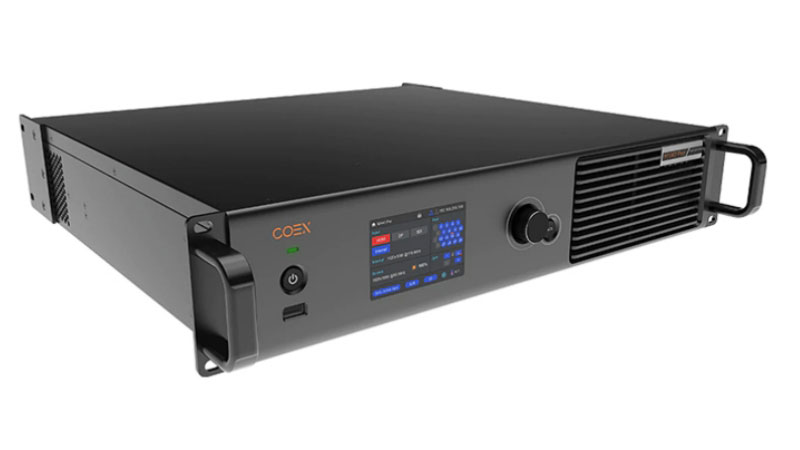
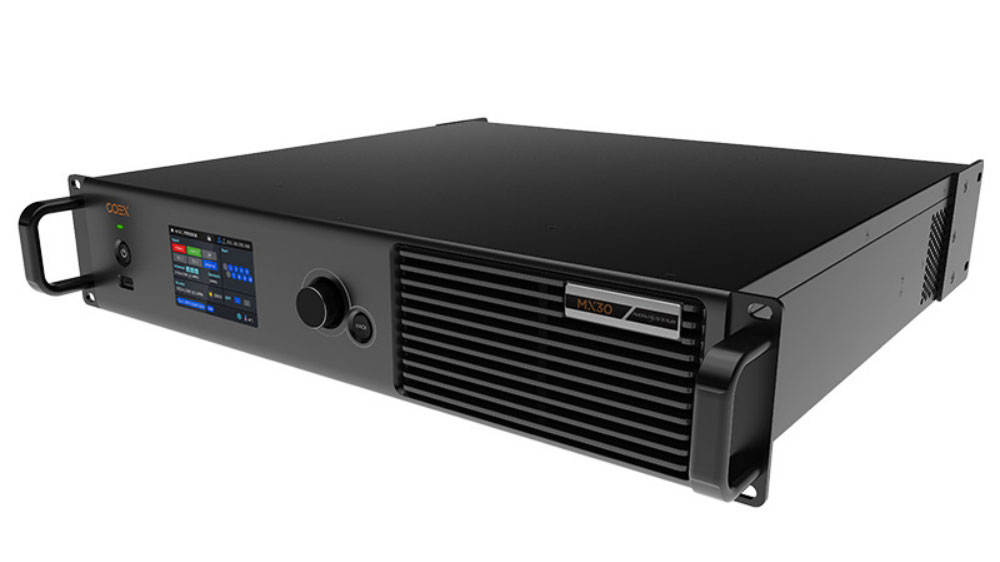
The decision logic is short. Match the controller to your project:
✔ MX20 — smaller walls with HD sources. Pick it when your wall stays under 3.9 million pixels, your sources are 1080p, and you want the smaller 1U chassis at the lower price.
✔ MX30 — bigger walls and 4K sources. Step up when the wall grows past that ceiling, a 4K HDMI source sits in your chain, or the project calls for HDR10 or HLG.
✔ MX40 Pro — broadcast and virtual production. Its 12G-SDI input takes 4K over one cable, and the four layers handle multi-source canvases. Extras like 3D LUT, Dynamic Booster, Shutter Fit, and 3D target xR stages and camera-heavy rigs. It also carries the most ports, so the biggest walls spread across 20 Ethernet outputs and four optical ports.
One check buyers often miss: the receiving cards decide the real capacity, so confirm the card model inside your cabinets before you commit to any of the three.
5. NovaStar MX20 Price
On our website, the MX20 sells for roughly $1,200 — noticeably below the numbers most resellers quote.
But a controller is rarely the whole budget, so the number that matters is the full signal chain: the MX20, receiving cards for your cabinet count, optical modules if you run fiber, and spares.
Register on our LED Screen Cloud Platform and you can check the live price yourself, compare controllers side by side, and submit an inquiry directly — no waiting for a salesperson to email you a quote.
The price you see updates with the market, and the comparison tool puts the MX20 next to the alternatives, so you can judge the value instead of trusting a single list price.
6. How to Set Up the MX20: Step by Step
Here is the sequence, based on the official user manual, that takes a fresh MX20 from rack to a working wall.
Step 1 — Connect power and sources.
Rack the unit, connect the AC cord, and press the standby button. Then plug your player or camera into HDMI 1, HDMI 2, or the SDI input. The status LED turns solid green when the controller runs normally.

Step 2 — Wire the Ethernet runs to the cabinets.
Run CAT5E cables (up to 100 m each) from output ports 1–6 to your cabinet chains. Label both ends now — when a port fails at midnight, the label tells you where to look.
Step 3 — Configure the screen.
This is where the two paths split:
Regular rectangular wall: use Swift Layout on the front panel. Under Screen Configuration, it asks for five values — cabinet rows, cabinet columns, cabinets on port 1, data flow direction, and offsets. Enter them, confirm, and the wall lights up in minutes, with no laptop in sight.
Curved, staggered, or mixed-cabinet walls: use VMP instead. Swift Layout assumes equal cabinets wired the same way on every port. In VMP you build the wall from real cabinet dimensions and wire the topology freely.

Step 4 — Verify with Mapping.
Run the Mapping function while you can still reach the cabinets: the wall displays each port number and receiving card index, so you can match the software topology against the physical chain. Photograph the result for the project file.

Step 5 — Adjust the picture and save a preset.
Set brightness, gamma, and color temperature, arrange layers if you use more than one source, and save the layout as one of the 128 presets. Next time, one click recalls the scene.
One extra note: up to 20 MX20 units can cascade over one LAN without extra switches, because network switching is built in.
7. Quick Screen Configuration
No file hunt here. The NovaStar MX20 user manual, the specifications sheet, and the firmware package are all attached in this section — grab them below and you have the complete document set for this controller.
Two things worth knowing before you install:
COEX VMP — the Vision Management Platform for Windows and macOS is the configuration software for the MX20. NovaLCT will not configure this box, so VMP is not optional.
Need anything else — VMP for another system, software for other NovaStar controllers, or the latest release notes? Head to our NovaStar Software page. It collects the newest downloads for every NovaStar software and product in one place, so it is worth bookmarking.
8. FAQ
Q1. Which receiving cards work with the MX20?
The MX20 supports the A10s Pro, A8s Pro, A8s, A8s-N, A7s Plus, A5s Plus, and B6s receiving cards and their series. If your cabinets run other cards, check with the screen supplier before you buy — features like Frame Rate Adaptive and full-grayscale calibration only work with the A10s Pro and A8s Pro lines.
Q2. Do I still need a separate sending card or video processor with the MX20?
In most cases, no. The MX20 is an all-in-one unit, so in All-In-One Controller mode it processes and sends in the same box. You only add upstream gear when you already run a separate video processor and want the MX20 in Send-Only mode.
Q3. How far can the MX20 sit from the LED wall?
Up to 100 meters over a CAT5E cable per Ethernet port — that is the documented limit. For longer distances, run the two 10G optical ports with fiber instead, and pick compatible NovaStar optical modules for the job.
Q4. Can I control several MX20 units from one computer?
Yes. Up to 20 MX20 units can cascade over one LAN through the Ethernet control ports, and no extra switch or router is needed because network switching is built in. All of them show up in one VMP project.
Q5. Does the MX20 output audio?
Yes. The SPDIF port carries digital audio taken from an HDMI 1.3 input source, so the sound follows the picture into your room's audio system.
9. Conclusion
The NovaStar MX20 earns its place as the entry point of the COEX series the honest way: the same VMP workflow, color tools, and calibration path as its bigger siblings, at a lower price. For walls up to 3.9 million pixels fed by HD sources, it covers the job in one 1U box.
If the wall grows or the rig turns camera-heavy, the MX30 and MX40 Pro wait one step up on the same platform. To compare them with live prices, register on our website and check the numbers yourself.
Still unsure which controller fits your wall? Contact us directly.