
Huidu HD-W63 Wi-Fi Control Card — A Practical Look at Specs and Setup
The Huidu HD-W63 is a Wi-Fi control card for single-color and dual-color LED displays.
This article covers what the card is built for, its full specifications, how the ports are laid out, and how to get one running, including its default Wi-Fi and setup passwords.
1. What Is the Huidu HD-W63?
The HD-W63 belongs to Huidu Technology‘s W-series of LED control cards, a lineup that also includes the W60, W62, W64A, and W66. Within that family, the W63 is built specifically for single-color and dual-color displays — not full-color video screens.
Huidu markets it for door-header displays and store signs, along with similar signage that relies on text, simple graphics, and clock or timer content rather than video playback. It’s a small circuit board, not a standalone screen, so it works alongside LED modules rather than replacing them.
In short, if a sign needs one color (or two) and doesn’t need to show full-color video, the W63 is the kind of card built to run it.
2. Key Features
The W63 doesn’t try to do everything. But within its lane, it’s fairly capable.
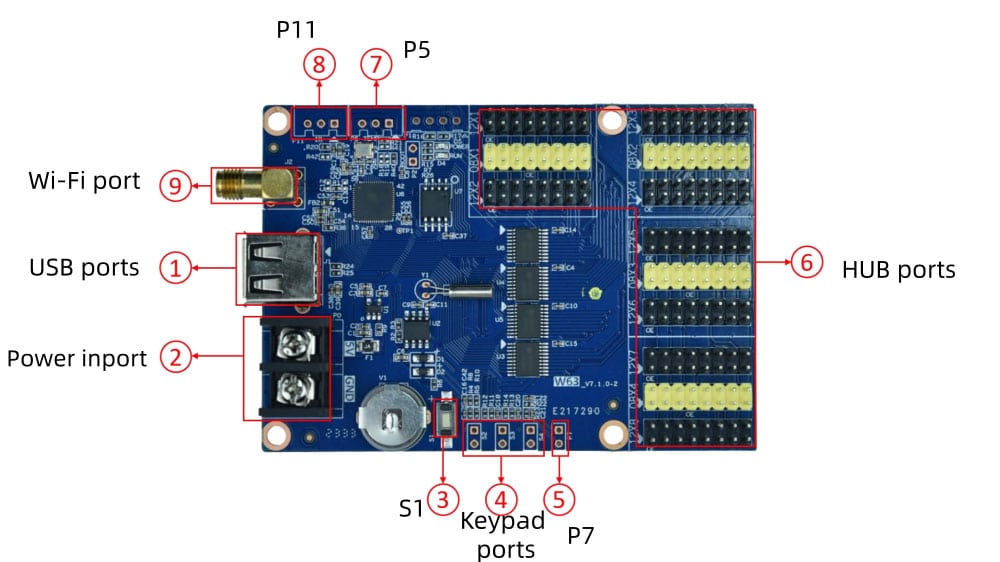
✔ Wi-Fi and USB updates.
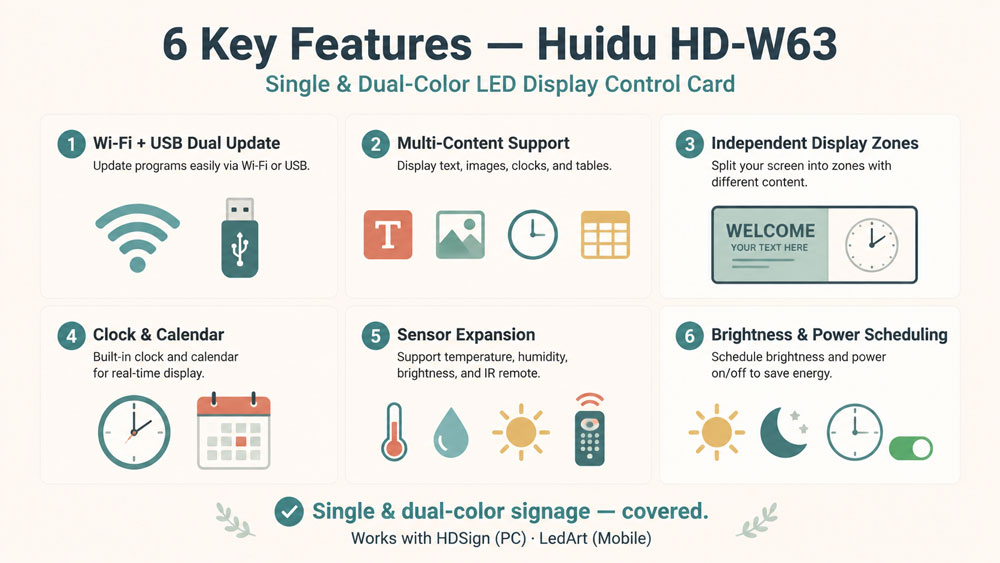
Power the card on, and it opens its own Wi-Fi hotspot right away. Connect a phone or laptop, and you can push a program straight to it. No Wi-Fi on site? Just load the file onto a USB drive instead. Installers dealing with weak signal at certain venues tend to rely on this a lot.
✔ Plenty of content types to work with.
Scrolling text is the obvious one, but the card also runs animated and 3D-style characters, static images, SWF graphics, and even Excel-based data. Real-time clocks, temperature and humidity readouts, countdown timers — all of it fits. A storefront could run a promo message and the current time on the same screen without much trouble.
✔ Separate display zones.
One screen, several jobs. The W63 divides the display into independent areas, each carrying its own content, effects, and border. A promotional line can scroll across one zone while a clock ticks along in another.
✔ Clock and calendar features that go beyond the basics.
Digital, dial-style, even lunar calendar — all built in, with font, size, color, and position adjustable for each. Multiple time zones are supported too, which comes up more than people expect for businesses running signage across different regions.
✔ Room for sensors.
Temperature, humidity, and light sensors can all plug into the card, along with an IR remote receiver. Wire one in, and the display starts reacting to real conditions — showing live temperature, or dimming automatically as the room gets darker.
✔ Brightness and power scheduling.
Set brightness by hand, let a sensor handle it, or schedule it by time of day. Either way, the screen stays readable at night without blinding anyone in daylight. There’s also a built-in timer that can switch the whole display on and off, useful for signs that don’t need to stay lit around the clock.
None of these features is flashy on its own. Together, though, they cover most of what a single or dual-color sign actually needs day to day.
3. Technical Specifications
Here’s what the official HD-W63 specification lists.
| Parameter | Details |
| Control range | Single color: 1024×128, max width 3072, max height 128 / Dual color: 512×128 |
| Flash memory | 4 MB total, about 3.5 MB usable for programs |
| Communication | Wi-Fi and USB flash drive |
| Program storage | Up to 1,000 programs |
| Display zones | 20 areas, each with separate effects and borders |
| Supported content | Text, animated and 3D characters, pictures, SWF graphics, Excel data, time, temperature/humidity, timers, lunar calendar |
| Playback control | Sequence playback, button switching, remote control |
| Clock functions | Digital, dial, and lunar clock; countdown and count-up; adjustable font, size, color, and position; multiple time zones |
| Expansion sensors | Temperature, humidity, light, and IR remote |
| Automatic switching | Timer-based screen on/off |
| Brightness control | Manual, sensor-based automatic, or time-scheduled |
| Working power | 3W |
| Work voltage | DC 4.2V–5.5V |
| Operating temperature | -40°C to 80°C |
| Operating humidity | 0–95% RH |
| Storage temperature | -40°C to 105°C |
| Software | HDSign (HD2020) for PC; LedArt and LedArt Lite apps for mobile |
Two things worth flagging before you move on:
The 3072 max width only applies if you keep the height low — width and height trade off against each other, they aren’t both maxed out at once.
The 3W working power is for the control card itself, not the LED modules it drives. Budget power separately for those.
4. Ports and Connections
The board carries a mix of large connectors for the LED modules and small header pins for everything else.
| Port | What it’s for |
| USB | Loads programs from a flash drive |
| Power terminal | 5V DC input |
| S1 button | Switches the screen into test mode |
| S2 / S3 / S4 keypad pins | Wire in physical buttons for next/previous program, timer control, or count reset |
| HUB12 / HUB08 (8× HUB12, 12× HUB08) | Output to LED display modules |
| P7 | Brightness sensor input |
| P5 | Temperature/humidity sensor input |
| P11 | IR remote receiver input |
| Wi-Fi antenna port | Connects an external antenna for a stronger signal |
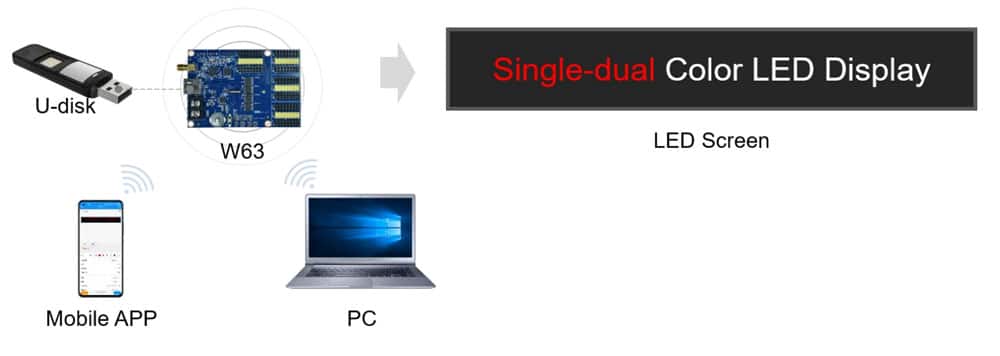
Most installers only touch four of these regularly: the power terminal, the USB port, the HUB output, and the Wi-Fi antenna port if the signal is weak. The rest — S1 through S4, P5, P7, P11 — matter mainly if you’re adding sensors, remote control, or manual buttons to the setup.
5. Setup Guide
Getting the HD-W63 running doesn’t take special tools, just a few steps in the right order.
① Power on. Connect the 5V DC supply. The card boots and opens its own Wi-Fi hotspot within seconds.
② Connect. Join that hotspot from a phone (LedArt / LedArt Lite app) or a computer (HDSign / HD2020).
③ Build and send. Create the display content and push it to the card over Wi-Fi.
④ No Wi-Fi? Use USB. Save the program to a flash drive and plug it into the card’s USB port — it loads automatically.
Once loaded, the program runs on its own. No ongoing connection needed.
Default passwords: Several third-party installer guides list 88888888 as the default Wi-Fi hotspot password and 168 as the software setup password (Check the label on the board if it doesn’t work).
6. HD-W63 vs Other W-Series Models
All four cards share the same core feature set — Wi-Fi and USB updates, 20 display zones, sensor support, three brightness modes. What changes is scale.
| Model | Single-color range | Dual-color range | Flash (usable) | HUB outputs |
| HD-W60 | 1024×32, max width 1536 | 512×32 | 4 MB (1 MB) | 2× HUB12, 1× HUB08 |
| HD-W62 | 1024×64, max width 2048 | 512×64 | 4 MB (1 MB) | 4× HUB12, 2× HUB08 |
| HD-W63 | 1024×128, max width 3072 | 512×128 | 4 MB (3.5 MB) | 8× HUB12, 12× HUB08 |
| HD-W64A | 1024×256, max width 4096 | 512×256 | 8 MB (5.2 MB) | 16× HUB12, 8× HUB08 |
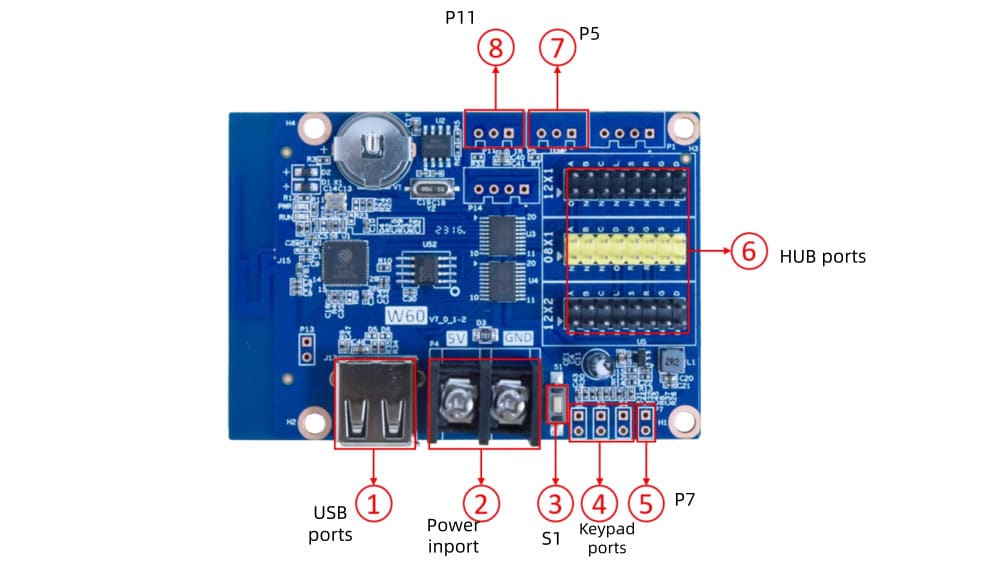
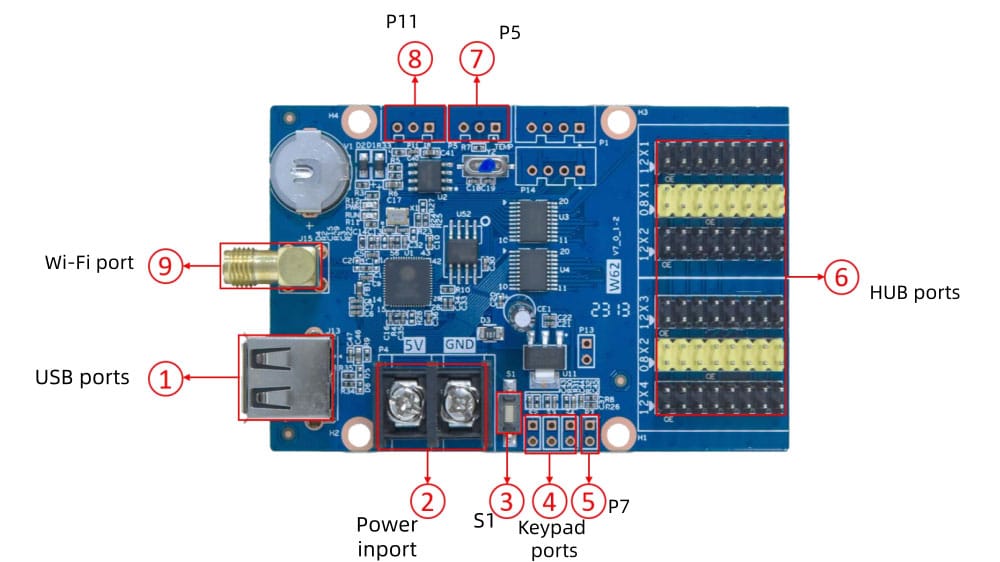
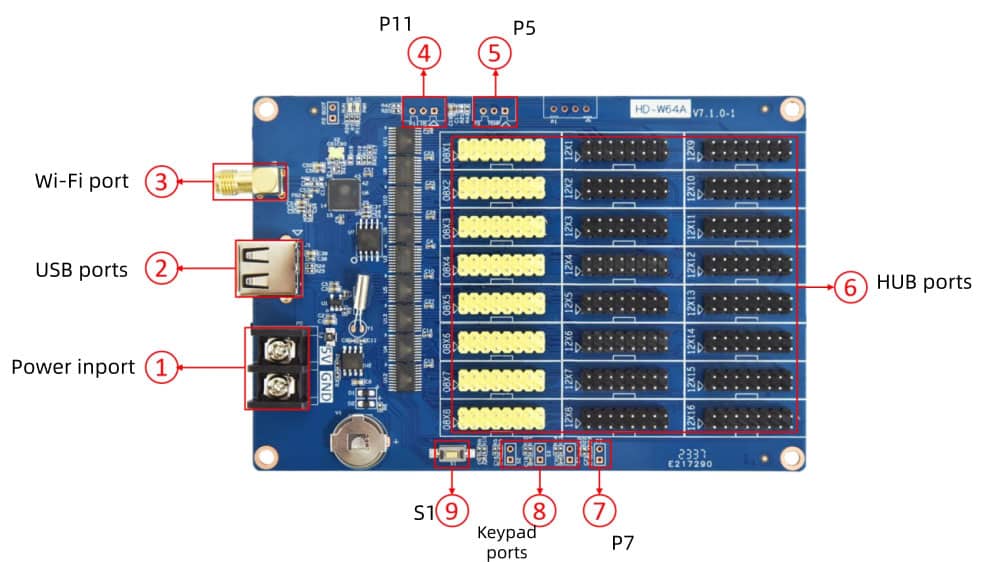
Control range and HUB12 output roughly double at each step up the lineup. HUB08 output doesn’t follow that same clean line — the W63 actually carries more HUB08 ports than the W64A above it. Overall, though, the W63 sits in the upper-middle of the series: well past the W60 and W62 in flash and output capacity, but a step below the W64A at the top.
7. Huidu W63 Price and Downloads
Huidu HD-W63 price varies by supplier, order size, and region. Register on LedInCloud – LED Screen Cloud Platform to check current pricing, and compare it against other Huidu models, as well as brands like NovaStar and Colorlight.
Downloads:
For HDSign, LedArt, and other Huidu software, visit the Huidu Resource Download page.
8. FAQ
Does the HD-W63 support full-color (RGB) displays?
No. The HD-W63 is designed for single-color and dual-color LED displays only. It does not support RGB full-color LED video screens.
Do I need a Wi-Fi router on-site to use it?
No. The HD-W63 has a built-in Wi-Fi hotspot, allowing direct connection without an external router or internet connection.
Is the HD-W63 rated for outdoor use?
The HD-W63 supports a wide operating temperature range from -40°C to 80°C, which is suitable for various outdoor environments. However, Huidu does not specify a waterproof or IP rating for the control card itself. Outdoor protection usually depends on the LED module and cabinet enclosure design.
What's the default Wi-Fi password?
The commonly used default Wi-Fi password for the HD-W63 is 88888888. If the password has been changed, reset the device or check the configuration settings to restore access.
9. Conclusion
The Huidu HD-W63 is built for one job — running single and dual-color signs — and it does that job well. Wi-Fi and USB updates, decent program storage, and sensor support cover most everyday signage needs without unnecessary complexity.
If a project needs full-color video, it’s the wrong card. For door-header displays, storefront boards, and similar text-based signs, it’s a solid, no-frills choice.