
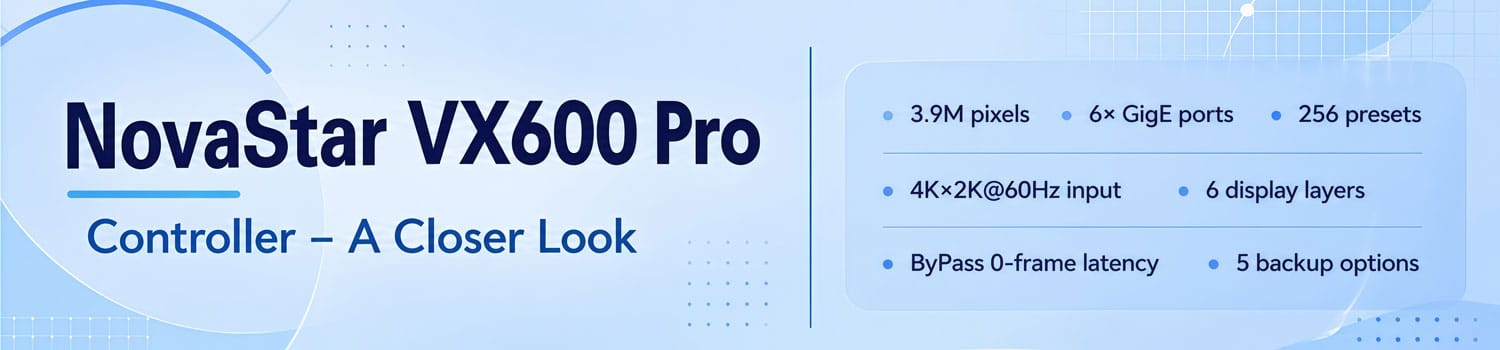
NovaStar VX600 Pro Controller — A Closer Look
The NovaStar VX600 Pro is a single-box solution for LED display control. It handles video processing and sending in one unit — no separate processor, no separate sending card.
It sits in NovaStar’s VX Pro series. It’s built for rental, staging, and fine-pitch installations.
Let’s break it down.
1. What Is the NovaStar VX600 Pro?
The VX600 Pro combines a video processor and a sending card into one 2U device. One box, one signal chain, less to deal with on site.
It supports three working modes: Video Controller, ByPass, and Fiber Converter. Which one you use depends on how your system is wired — we’ll cover that in Section 3.
It’s aimed at medium to high-end rental crews, touring productions, and fine-pitch LED installations. If your signals are 4K, your layouts are complex, or downtime isn’t an option, this is the device NovaStar built for that.
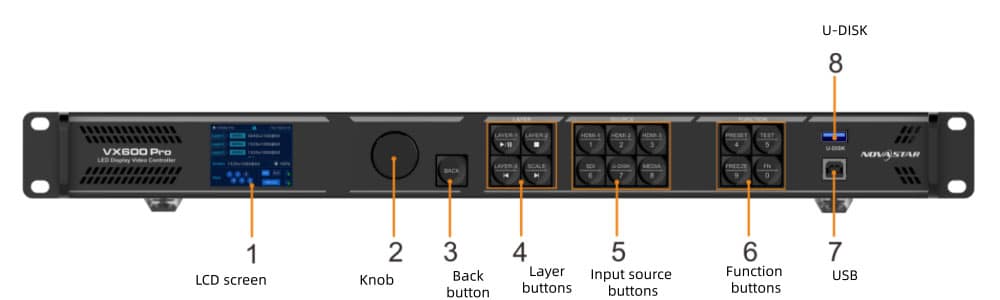
2. NovaStar VX600 Pro Specs
Here’s a full breakdown of the VX600 Pro specs.
2.1 General
| Item | Detail |
| Pixel capacity | 3.9 million pixels |
| Max output width | 10,240 pixels |
| Max output height | 8,192 pixels |
| Working modes | Video Controller / ByPass / Fiber Converter |
| Max layers | 6 |
| Max presets | 256 |
| Power consumption | 43W |
| Dimensions | 482.6 × 302.2 × 50.1 mm |
| Net weight | 3.9 kg |
| Operating temperature | 0°C to 50°C |
| Noise level | 45 dB(A) at 25°C |

2.2 Input Connectors
| Connector | Qty | Max Resolution |
| HDMI 2.0 (IN & LOOP) | 1 | 4096×2160@60Hz |
| HDMI 1.3 | 2 | 1920×1080@60Hz |
| 3G-SDI (IN & LOOP) | 1 | 1920×1080@60Hz |
| 10G Optical Fiber (OPT 1) | 1 | Self-adaptive |
| USB 3.0 | 1 | Media playback |
2.3 Output Connectors
| Connector | Qty | Notes |
| Gigabit Ethernet | 6 | 650,000 pixels per port (8-bit) |
| 10G Optical Fiber | 2 | OPT 1 + OPT 2 |
| HDMI 1.3 (Monitor) | 1 | Fixed 1920×1080@60Hz |
| 3D Connector | 1 | Third-party 3D emitter |
3. Key Features Explained
Some of these features are easy to overlook in a spec sheet. Here’s what they actually mean in practice.

3.1 Three Working Modes
How the VX600 Pro behaves depends entirely on which mode you’re in.
Video Controller is the default. It handles both video processing and LED display control. OPT 1 is self-adaptive — connect it to a fiber converter and it acts as output; connect it to a video processor and it switches to input automatically.
ByPass cuts out video processing entirely. The signal passes through pixel for pixel. Latency drops to 0 frames when combined with the low latency feature. The tradeoff: scaling and layers are unavailable in this mode.
Fiber Converter is for long-distance runs. Both OPT 1 and OPT 2 act as inputs, and the 6 Ethernet ports handle output.
3.2 6 Display Layers
The VX600 Pro runs 6 layers simultaneously. You can mix three layer sizes:
- 4K×2K — uses 4× resources
- 4K×1K — uses 2× resources
- 2K×1K — uses 1× resource
Each layer has independently adjustable size, position, priority, and aspect ratio.
3.3 Low Latency
In Video Controller mode with low latency enabled, the VX600 Pro hits 1–2 frames. Switch to ByPass and it drops to 0 frames.
There’s also an Auto mode — the system decides based on your screen topology. One thing to note: in ByPass mode, low latency and Genlock can’t run at the same time. In Video Controller mode, they can.
3.4 Backup Options
The VX600 Pro supports five backup types: between devices, between input sources, between Ethernet ports, between OPT and Ethernet ports, and dual receiving card backup.
There’s also an Ethernet port backup test. It lets you verify your backup setup without unplugging any cables — useful before a live show. And if power cuts out unexpectedly, the device restores its last saved configuration automatically when it comes back on.
3.5 Device Restoration
You can create up to 5 restore points (total limit: 1 GB). Each one captures the full device configuration at that moment. If something goes wrong, select a restore point and roll back.
3.6 OSD
The VX600 Pro supports text OSD and image OSD. Text OSD comes in four types: static text, dynamic scrolling text, weather display, and time display. Font, color, size, opacity, and background are all customizable.
Two limitations: text OSD and image OSD can’t run at the same time. Dynamic text OSD can’t be used alongside other text OSD components either.
3.7 USB Playback
Plug a USB 3.0 drive into the front panel and the VX600 Pro plays media directly. It supports MP4, MKV, MOV, AVI, FLV, and more. H.265 handles up to 3840×2160@60fps, H.264 up to 3840×2160@30fps. Max bitrate is 100 Mbps.
The USB source outputs at a fixed 1920×1080@60Hz. The drive needs to be single-partition, formatted as NTFS, FAT32, or exFAT.
4. VX600 vs VX600 Pro — What's the Difference?
Both share the same pixel capacity and 6 Ethernet output ports. But beyond that, they’re quite different devices.
| Feature | VX600 | VX600 Pro |
| Max input resolution | 1920×1200@60Hz | 4096×2160@60Hz |
| HDMI input | 2× HDMI 1.3 | 1× HDMI 2.0 + 2× HDMI 1.3 |
| DVI input | Yes (1×) | No |
| Layers | 3 | 6 |
| Presets | 10 | 256 |
| USB playback | No | Yes (USB 3.0) |
| ByPass latency | ~20 lines | 0 frames |
| OSD | No | Yes |
| Backup types | 3 | 5 |
| Dual receiving card backup | No | Yes |
| 3D connector | No | Yes |
| Mac compatibility | No | Yes |
| Operating temperature | -10°C to 45°C | 0°C to 50°C |
| Power consumption | 35W | 43W |
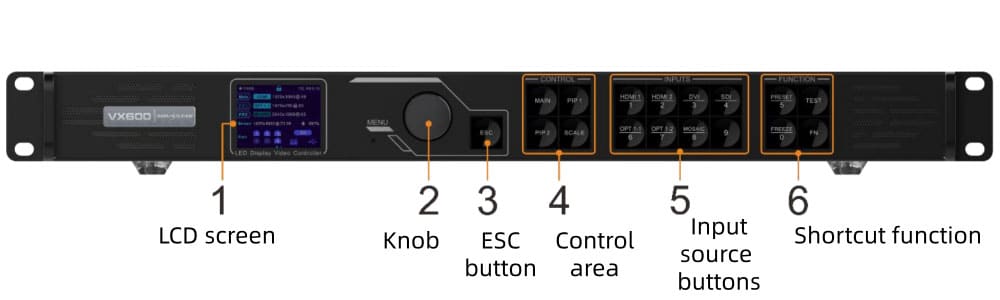
The VX600 covers most standard setups just fine. If your sources are 1080p or below, you run 3 layers or fewer, and you still use DVI output devices — it does the job. That said, the VX600 Pro drops DVI entirely, so if your current gear relies on DVI, that’s worth factoring in before you upgrade.
The VX600 Pro makes more sense when you’re running true 4K sources, managing complex multi-layer content, or working on productions where redundancy matters. The jump from 10 to 256 presets alone is significant for anyone doing back-to-back shows.
So the question isn’t which one is better. It’s which one actually fits your setup.
5. NovaStar VX600 Pro Price
The NovaStar VX600 Pro is priced at around $970.
If you’re comparing the VX600 Pro against other controllers in this range, it’s worth looking at the full system cost — not just the unit price. The right receiving cards and fiber modules add up, and getting that combination wrong costs more in the long run.
For an accurate quote based on your actual project — screen size, quantity, and destination all affect the final number — register LedInCloud and our team will get back to you directly.
6. NovaStar VX600 Pro Software & Manual Download
There are a few resources you’ll need when setting up or managing the VX600 Pro.
6.1 VX600 Pro Resources
The following files are available directly:
✔ NovaStar VX600 Pro User Manual
6.2 Other Softwares
The VX600 Pro works with several NovaStar software tools. You can find all of them on our NovaStar Software download page. Just find the file you need and click to download.
7. FAQ
How many pixels can the NovaStar VX600 Pro drive?
Up to 3.9 million pixels across 6 Gigabit Ethernet ports. Each port handles up to 650,000 pixels at 8-bit. Max output width is 10,240 pixels and max height is 8,192 pixels.
What's the latency on the VX600 Pro?
It depends on the working mode. In Video Controller mode with low latency enabled, you're looking at 1–2 frames. Switch to ByPass mode and it drops to 0 frames. In Fiber Converter mode, latency is also 0 frames.
Does the VX600 Pro support fiber output?
Yes. It has two 10G optical fiber ports — OPT 1 and OPT 2. OPT 1 is self-adaptive, meaning it switches between input and output automatically depending on what's connected. OPT 2 handles copy or backup output. Optical modules aren't included and need to be purchased separately. Single-mode modules reach up to 10 km; multi-mode tops out at 300 m.
What software does the VX600 Pro use?
The VX600 Pro works with NovaLCT, Unico, VICP app, and V-Can.
Does the VX600 Pro work with Mac?
Yes. Mac compatibility was added in firmware V1.2.0, released in September 2025.
8. Conclusion
The NovaStar VX600 Pro is a solid mid-range controller for rental, staging, and fine-pitch LED installations. 4K input, 6 layers, 256 presets, and 5 backup options — it covers a lot of ground in one box.
If your sources are 1080p and your setups are simple, the standard VX600 is enough. But if you’re running complex productions where reliability matters, the Pro version is worth it.
Interested in a quote? Register on LedInCloud – LED Screen Cloud Platform, and our team will get back to you based on your project requirements.