
NovaStar TB20 Plus: Specs, Features & Downloads
The NovaStar TB20 Plus is one of the most widely used multimedia players in NovaStar’s Taurus series. It supports 4K hardware decoding, runs on Android 10, and drives up to 650,000 pixels per output.
This page covers everything you need to know about the NovaStar TB20 Plus — specs, key features, use cases, pricing, and official downloads including the TB20 Plus manual.
Table of Contents
1. NovaStar TB20 Plus Introduction
The NovaStar TB20 Plus multimedia player is part of NovaStar Taurus series, under the Nova Cloud product line. It’s the successor to the older TB2-4G.
The core idea behind the NovaStar Taurus series is simple. Instead of running a separate media player and sending card, you get both functions in one device. That simplifies installation and reduces points of failure on the job site.
The TB20 Plus takes this further than the entry-level TB10 Plus. It adds HDMI input and a physical button to switch between synchronous and asynchronous modes — giving it more flexibility for projects that go beyond basic digital signage.
The NovaStar TB20 Plus supports 4K hardware decoding, drives up to 650,000 pixels, and operates on Android 10.
2. Key Features
The TB20 Plus packs a lot into a small box. Below are the features that matter most.
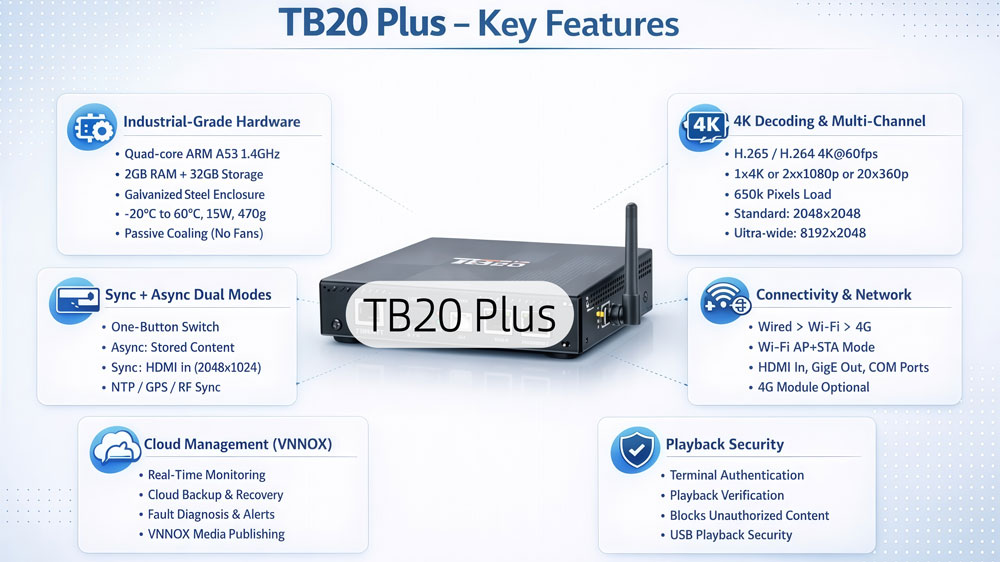
2.1 Industrial-Grade Hardware
The NovaStar TB20 Plus is built for commercial deployments, not consumer use. Here’s what’s inside.
It runs on a quad-core ARM A53 processor at 1.4GHz — an industrial-grade SoC chip. That matters for displays running 24/7 in demanding environments.
Memory is 2GB RAM and 32GB internal storage. The 2GB RAM keeps 4K playback smooth and gives the system enough headroom to handle background tasks without slowing down.
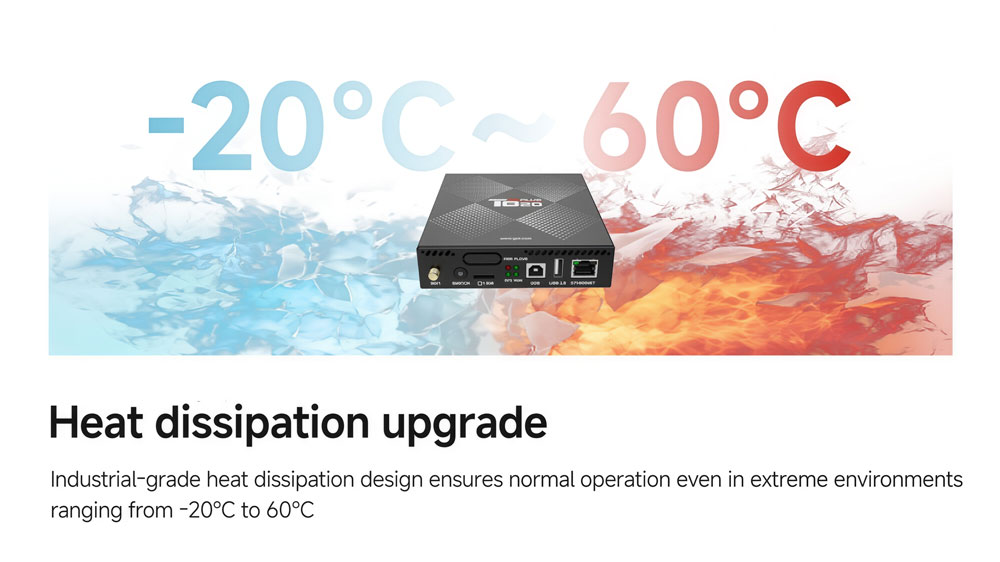
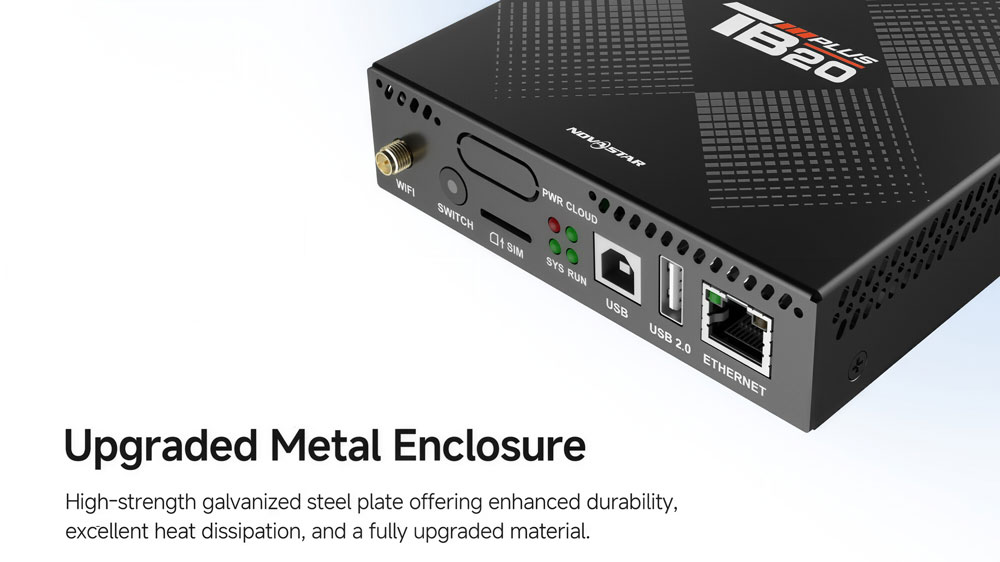
The enclosure is high-strength galvanized steel plate with fully passive cooling — no fans, no moving parts. It runs on DC 5V to 12V input, draws a maximum of 15W, and operates at -20°C to +60°C.
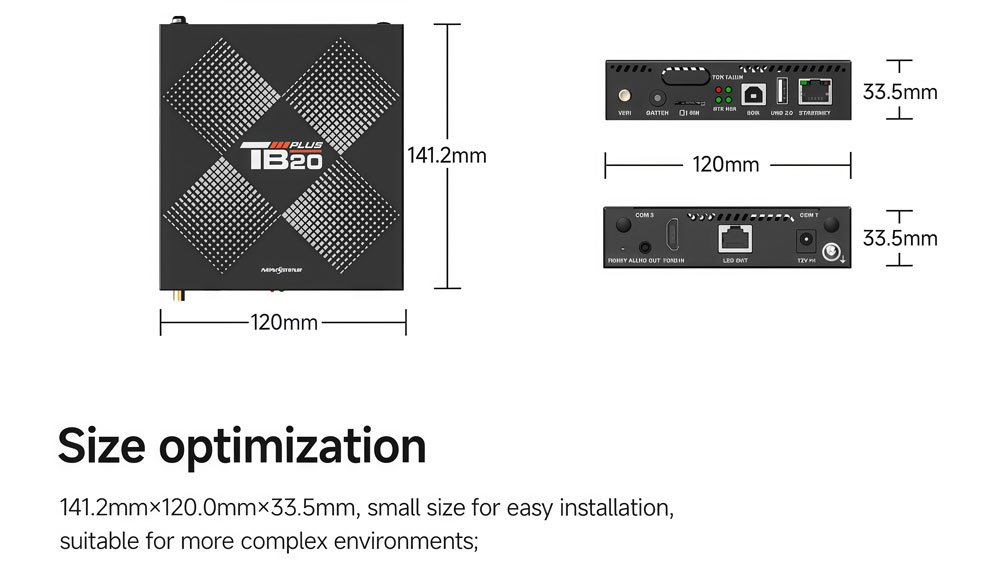
Physical size is 141.2mm × 120.0mm × 33.5mm, weighing 470g. Small enough to mount directly behind most LED cabinets.
2.2 4K Decoding and Multi-Channel Playback
The TB20 Plus 4K decoding is handled entirely in hardware — supporting H.265/HEVC at 60fps, H.264 at 30fps, and up to 20 simultaneous video streams. That keeps playback smooth without putting pressure on the CPU. In a single session, the TB20 Plus handles 1×4K, 2×1080p, 4×720p, 4×480p, or up to 20×360p simultaneously. Here’s the full breakdown of supported video codecs:
| Codec | Max Resolution | Max Frame Rate | Max Bit Rate |
| H.265/HEVC | 4096×2304 | 60fps | 100Mbps |
| H.264 | 4096×2304 | 30fps | 60Mbps |
| VP9 | 4096×2304 | 30fps | 49Mbps |
| MPEG4 | 1920×1088 | 60fps | 29Mbps |
| VP8 | 1920×1088 | 60fps | 60Mbps |
For images, it supports JPEG, BMP, PNG, GIF, and WEBP up to 4096×2304 pixels.
Keep in mind that enabling synchronous playback across multiple screens cuts the decoding capacity in half. If you’re planning a multi-screen sync setup, factor that into your content resolution and bitrate planning.
Maximum loading capacity is 650,000 pixels. In standard mode, max width and height are both 2048 pixels. Switch to ultra-wide mode and the width extends to 8192 pixels — useful for stretched horizontal displays in transit hubs or retail storefronts.
2.3 Synchronous and Asynchronous Modes
This is what sets the TB20 Plus apart from the TB10 Plus. It supports both modes — and switching between them takes one button press.
In asynchronous mode, the device plays stored content from internal memory or a connected USB drive. No live video source needed. This is the standard mode for scheduled digital signage.
In synchronous mode, the TB20 Plus takes a live HDMI 1.3 signal as its video source and mirrors it to the LED screen in real time. Switch between the two modes using the SWITCH button on the front panel — no software, no rebooting.
The HDMI input has a few limits to keep in mind:
- Maximum input resolution: 2048×1024@60Hz
- Supports HDCP 1.4 (backwards compatible with HDCP 1.3)
- No interlaced signal input supported
- In sync mode, full-screen auto-scaling is available — but images can only be scaled down, not up
For multi-screen synchronization, the TB20 Plus supports three time sync methods: NTP (over wired or Wi-Fi), GPS (requires optional 4G module), and RF (requires optional RF module).
2.4 Connectivity and Network
The TB20 Plus offers flexible connectivity options for both control and content delivery.
Front panel:
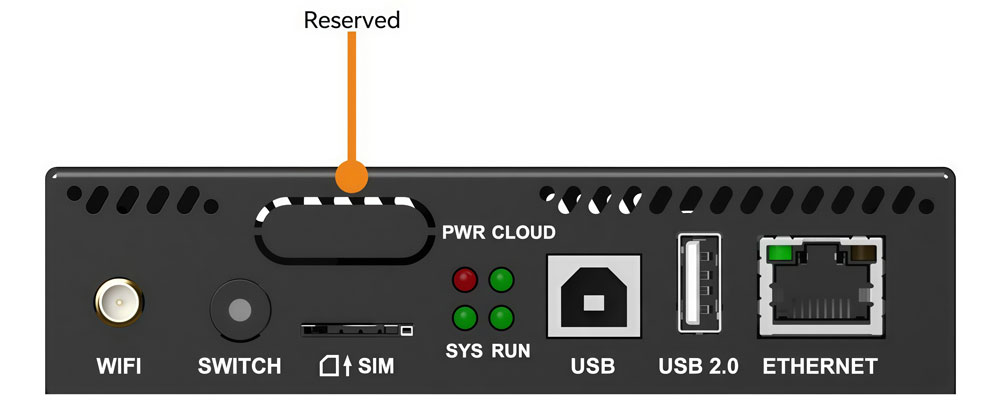
| Port | Function |
| Wi-Fi antenna | 2.4GHz Wi-Fi connectivity |
| Sensor port | Connects to light sensor or temperature/humidity sensor |
| SWITCH button | Toggles between sync and async mode |
| SIM card slot | Fool-proof orientation design |
| USB Type-B | Connects to control PC for content publishing |
| USB 2.0 Type-A | USB playback, firmware updates, storage expansion up to 128GB |
| Fast Ethernet | Control network connection |
Rear panel:
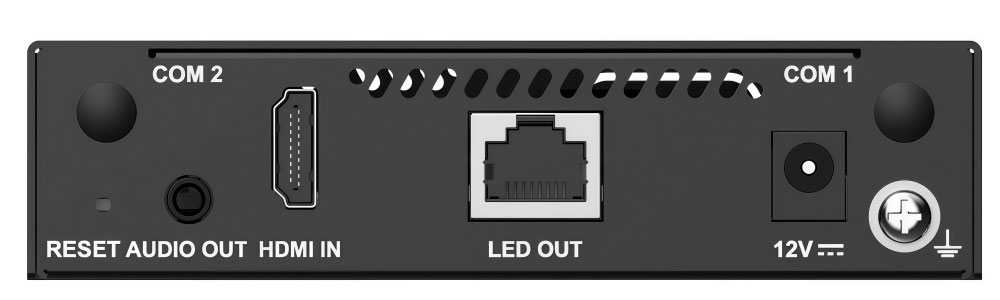
| Port | Function |
| 3.5mm audio output | Stereo audio output |
| HDMI 1.3 input | Live video source in sync mode |
| Gigabit Ethernet | LED output to the display |
| 12V DC | Power input |
| COM2 | GPS antenna connector |
| COM1 | 4G antenna connector |
| Reset button | Hold 5 seconds to restore factory settings |
Network priority runs automatically: Wired > Wi-Fi > 4G. If wired drops, the device falls back to Wi-Fi, then 4G — no manual switching needed.
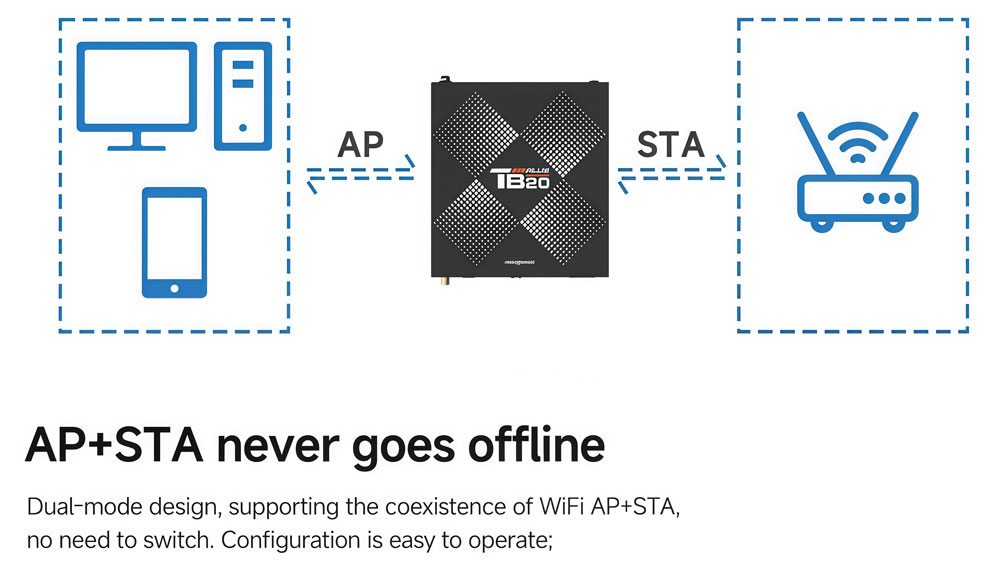
The Wi-Fi AP+STA dual mode lets you stay connected to your main router while the device’s own hotspot stays active at the same time. That means you can access the device directly from a phone or tablet without dropping its network connection.
Note: the TB20 Plus ships without a 4G module. Purchase it separately if your installation needs cellular connectivity or GPS time sync.
2.5 Cloud Management: VNNOX
The TB20 Plus works with NovaStar’s VNNOX Care and VNNOX Media platforms. It supports real-time remote monitoring, cloud backup, one-click recovery, and fault diagnosis — all from a mobile or desktop interface.
Here’s what it does in practice:
- Real-time monitoring — screen status, temperature, and connection state, visible remotely at any time
- Cloud backup and one-click recovery — configuration files back up automatically. If a device fails, restoring takes one step
- Fault diagnosis — pinpoints exactly which receiving card or output has the issue, not just a generic alert
For content publishing, VNNOX Media handles one-click program release, screen layout, and scheduling — without touching the hardware.
2.6 Playback Security
The TB20 Plus includes multiple protection measures to keep playback stable and secure. Terminal authentication and playback verification run in the background, blocking unauthorized content from being pushed to the screen. USB playback is also supported, with the same security measures applied.
3. Full Specifications Table
Here is the complete technical specification of the NovaStar TB20 Plus.
| Parameter | Details |
| Processor | Quad-core ARM A53 @ 1.4GHz |
| RAM / Storage | 2GB / 32GB |
| OS | Android 10 |
| Max Loading Capacity | 650,000 pixels |
| Max Width (Ultra-wide) | 8192 pixels |
| Video Decoding | H.265 4K@60fps, H.264 4K@30fps |
| Playback | 1×4K / 2×1080p / 4×720p / 20×360p |
| HDMI Input | HDMI 1.3, max 2048×1024@60Hz |
| LED Output | Gigabit Ethernet |
| Wi-Fi | 2.4GHz, AP+STA dual mode |
| Input Voltage | DC 5V – 12V |
| Max Power | 15W |
| Operating Temperature | -20°C to +60°C |
| Dimensions | 141.2 × 120.0 × 33.5mm |
| Certifications | CE, FCC, IC, CQC, CB, NTRA |
| Cloud Platform | VNNOX Care / VNNOX Media |
4. Typical Use Cases
The TB20 Plus fits a wide range of commercial LED display projects. Here are the most common ones.

Retail chain networks
Push content updates to multiple locations through VNNOX — no site visits needed. Schedule promotions, swap pricing displays, and monitor every screen from one dashboard.
Lamp-post and street displays
The -20°C to +60°C operating range handles outdoor temperature swings well. The wide voltage input also tolerates power fluctuations common in street-level infrastructure.
Airport and transit signage
Ultra-wide playback up to 8192 pixels suits stretched horizontal displays in departure halls and concourses. Multi-screen frame sync keeps tiled walls consistent over long operating hours.
Conference rooms and exhibition halls
Synchronous HDMI mode lets you mirror a laptop or media player to the LED wall in real time. One button press switches back to scheduled content when the presentation ends.
Smart city digital signage
Cloud management keeps things running across large geographic areas. The sensor port supports automatic brightness adjustment based on ambient light — useful for screens that need to adapt between day and night.
5. TB10 Plus vs TB20 Plus: Which One to Buy
Both devices look almost identical on paper. Same processor, same RAM, same storage, same OS, same enclosure size, same operating temperature range. But there are two key differences that determine which one fits your project.
| Spec | TB10 Plus | TB20 Plus |
| Playback Mode | Asynchronous only | Asynchronous + Synchronous |
| HDMI Input | No | Yes (HDMI 1.3) |
| Sync/Async Switch | No | Yes (front panel button) |
| Processor | A53 @ 1.4GHz | A53 @ 1.4GHz |
| RAM / Storage | 2GB / 32GB | 2GB / 32GB |
| Max Pixels | 650,000 | 650,000 |
| Operating Temp | -20°C to +60°C | -20°C to +60°C |
| Cloud Platform | VNNOX | VNNOX |
The TB10 Plus is the right pick if your setup is purely asynchronous — scheduled content from internal storage or USB, no live video input needed. Check out our full NovaStar TB10 Plus guide for more details.
The TB20 Plus makes more sense if you need HDMI input for live content, or if your project might involve synchronous playback down the line.
6. TB20 Plus Price
The NovaStar TB20 Plus is priced at around $112. Final pricing may vary depending on your region and order volume.
For an accurate quote, register LedInCloud — you can get a price online directly through our LED Screen Cloud Platform, no back-and-forth emails needed.
7. NovaStar TB20 Plus Manual & Downloads
Looking for the NovaStar TB20 Plus manual or firmware files? All official resources are available below.
Need more NovaStar resources? Visit our NovaStar Software page for a full library of downloads — firmware, software, and documentation for the entire NovaStar product range.
8. FAQ
Q: What is the difference between the TB20 Plus and TB10 Plus?
The hardware is almost identical. The TB20 Plus adds HDMI input and a front-panel button to switch between synchronous and asynchronous modes. The TB10 Plus only runs in asynchronous mode and has no HDMI input.
Q: Does the TB20 Plus come with a 4G module?
No. It ships without one. Purchase the optional 4G module separately if your installation needs cellular connectivity or GPS time sync.
Q: Can the TB20 Plus be used outdoors?
The operating temperature range is -20°C to +60°C, so it handles most outdoor environments. However, the IP rating is IP20 — install it inside a weatherproof enclosure for fully exposed outdoor deployments.
Q: What USB drives are compatible?
FAT32 or NTFS formatted drives, between 2GB and 128GB. Individual files must be under 4GB.
Q: Does HDMI input work in asynchronous mode?
No. HDMI input only works in synchronous mode. In async mode, content comes from internal storage or USB.
Q: What video formats does the TB20 Plus support?
It supports H.265/HEVC, H.264, VP9, MPEG4, and VP8 for video. For images, it handles JPEG, BMP, PNG, GIF, and WEBP.
Q: What is the maximum pixel loading capacity?
The TB20 Plus drives up to 650,000 pixels per output. In ultra-wide mode, the maximum width extends to 8192 pixels.
9. Conclusion
The NovaStar TB20 Plus is a multimedia player that supports 4K hardware decoding, drives up to 650,000 pixels, and runs on Android 10 with VNNOX cloud management. It’s a reliable choice for commercial LED display projects that need both stored content playback and live HDMI input.
the decision comes down to one thing: do you need HDMI input or synchronous playback? If yes, the TB20 Plus is the right pick. If not, the TB10 Plus does the job at a lower price point.