
NovaStar ET1S-G Media Server: Specs, Setup and Price
The NovaStar ET1S-G is a 1U rack media server for small-scale LED and LCD fixed installations. It stores, decodes and plays video, images, PowerPoint and NDI sources on one 4K×2K@60Hz canvas, then feeds the picture to your LED controller over DP or HDMI. Current units ship with Kompass FX3 Pro Basic on Windows 10 Enterprise LTSC.
1. What Is the NovaStar ET1S-G?
The NovaStar ET1S-G media server is the entry model of NovaStar’s ET series. It is a 1U rack unit that plays the content itself, so no separate playback PC sits in the rack. It targets showrooms, exhibition stands, small conference rooms and creative fixed installs.
An LED media server is not the same thing as an LED media player. A NovaStar Taurus multimedia player plays a scheduled playlist and drives the screen directly. The ET1S-G sits in front of your LED controller instead, mixing layered content (local files, web pages, NDI and streams) and handing a finished 4K picture to the downstream processor.
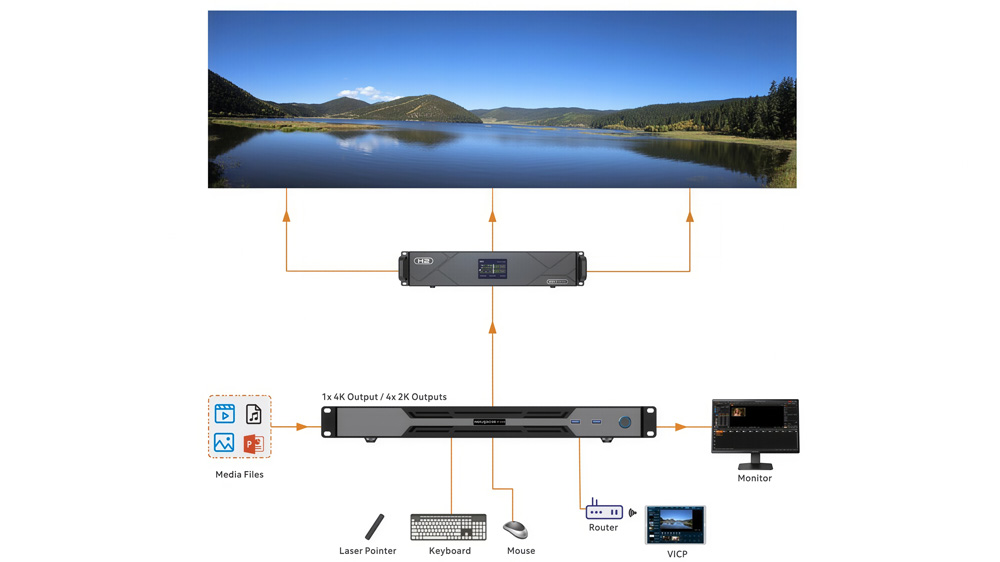
The signal chain looks like this: media files → ET1S-G → DP or HDMI → LED controller or processor → receiving cards → screen. NovaStar rates it for one 4K×2K@60Hz canvas, with custom resolutions up to 7680 px wide for ultra-wide walls.

2. Specifications
The ET1S-G packs a complete playback system into a single rack unit. Most buying decisions come down to a handful of numbers: canvas size, decoding budget, connectivity and rack space.
2.1 Hardware and Playback Specs
| Item | ET1S-G |
| CPU | Intel Core i3-1215U, 6 cores / 8 threads |
| Memory | 16 GB DDR4 |
| Storage | 256 GB M.2 SSD |
| Output capacity | 1× 4K×2K@60Hz |
| Custom resolution | Up to 7680 px wide or 4095 px high |
| Layers | Up to 20 |
| Partitions per output | Up to 1024 |
| Video outputs | 1× DP 1.2, 1× HDMI 2.0/1.3, 4× HDMI 1.3 |
| Audio | DP / HDMI 2.0 embedded (24-bit stereo), 3.5 mm mic in and line out |
| OS / software | Windows 10 Enterprise LTSC, Kompass FX3 Pro Basic |
| Power | 100 to 240 V AC, 80 W max |
| Size / weight | 482.6 × 407.5 × 50.1 mm, 5.2 kg |
| Operating temperature | 0°C to 45°C |
| Certifications | CE, FCC, IC, RCM, CB, KC |
NovaStar lists the decoding budget as one 4K×2K@60fps stream or four 2K×1K@60fps streams. Treat that, not the layer count, as the real playback limit. The cooling design passed a 720-hour stress test, and the unit draws at most 80 W from its 120 W supply.

2.2 Outputs and Mosaic Modes
The DP 1.2 port is the master output. From there you have three routing options:
- HDMI 2.0 mirrors the DP content at up to 4K×2K@60Hz.
- The four HDMI 1.3 ports each copy the DP picture at up to 2K×1K@60Hz.
- The same four ports switch to mosaic mode and split one canvas in layouts of 1×2, 1×3, 1×4, 2×1, 2×2, 3×1 or 4×1.
Two details catch buyers out. The HDMI 2.0/1.3 port is switchable: in HDMI 2.0 mode, HDMI 1.3 ports 2, 3 and 4 go dark. And the HDMI 1.3 ports carry no audio. Sound goes out through the DP or HDMI 2.0 path, or the 3.5 mm line-out.
3. NovaStar ET1S-G Price
The ET1S-G price moves with the hardware revision, the shipped software edition and storage, so a one-size figure misleads. Instead, register on LedInCloud – LED Screen Cloud Platform and check current ET1S-G pricing yourself, alongside pricing for the wider NovaStar control range. Want a quote matched to your project? Send your screen size and playback plan after registering, and the team will price the full setup.
4. How to Set Up the ET1S-G?
Setup follows the quick start guide’s own path: connect the hardware, map the output, load media, play. Here is that path with the details that matter.
4.1 Connect and Configure the Output
First, connect a monitor to the CONTROL UI port, plus a keyboard and mouse over USB. Then send the program output from DP or HDMI to your LED controller, and set the output canvas to match the wall. Finally, lock the EDID so the controller holds a stable timing.
The unit sits horizontally in a 19-inch rack; vertical mounting is off limits. Front USB 3.0 ports take a stick with media files, and the gigabit Ethernet port joins the venue network for remote control.
4.2 How to Map Partitions on the ET1S-G
Mapping means dividing the output canvas into regions and assigning each region to a screen area. A single output splits into up to 1024 partitions, so one canvas can cover an ultra-wide or irregular wall without extra hardware.
You draw the partitions in the output settings, and the mapped regions line up with the physical cabinets. When the picture lands in the wrong place, the fix follows the same path as any LED screen mapping check: confirm the port order before blaming the content.
4.3 VICP Tablet Control
The NovaStar VICP app runs the show from a tablet over the network. In the playback software, open Settings > External Control, tick TCP/IP, and set a listening port between 1024 and 65535. VICP then switches programs and pauses individual layers, so an operator can walk the room and still control playback. A laser pointer moves PowerPoint slides during a talk.

5. Which Software Does the NovaStar ET1S-G Use?
Current ET1S-G units ship with Kompass FX3 Pro Basic Edition on Windows 10 Enterprise LTSC.
5.1 What Kompass Does
- Media library with batch import: video, images, audio and PowerPoint files up to 1080p.
- You build programs by dragging media onto layers in the stage area, with position, crop and size controls per layer.
- One layer acts as the main media: program switching follows its progress, with crossfades and one-click FTB.
- Unattended mode: the software starts on power-up and auto-plays the program.

5.2 FX1 vs FX3 Pro Basic
Older units run FX1 with 4 layers. Current units run FX3 Pro Basic with 20 layers, and a license activates the software.
For the software itself, see our NovaStar Kompass FX3 page, and grab installers and manuals from LedInCloud.
6. NovaStar ET1S-G vs ET2S-G
Pick the ET1S-G for one 4K-class canvas. Move to the ET2S-G when the project runs two 4K screens at once or decodes 8K-wide material. The table below compares the current specifications of both models.
| Item | ET1S-G | ET2S-G |
| Chassis | 1U | 2U |
| CPU | Intel Core i3-1215U | Intel Core i5-12400 |
| Output connectors | 1× DP 1.2, 1× HDMI 2.0/1.3, 4× HDMI 1.3 | 1× DP 1.2, 2× HDMI 2.0 |
| Output capacity | 1× 4K×2K@60Hz | Up to 8K×2K (single connector 4K×2K@60Hz) |
| Decoding | 1× 4K×2K@60 or 4× 2K×1K@60 | 1× 8K×2K@60 or 2× 4K×2K@60 |
| Layers | 20 | 40 |
| Partitions per output | Up to 1024 | Up to 64 |
| Software | Kompass FX3 Pro Basic | Kompass FX3 Pro Advanced |
| OS | Windows 10 Enterprise LTSC | Windows 11 IoT Enterprise LTSC |


One row favors the entry model: the ET1S-G splits a single output into up to 1024 partitions, against 64 on the ET2S-G, which helps on ultra-wide walls. But neither model has frame sync or dual-machine backup. Those appear on the ET4S-G with a sync card and on the ET16S-G.
7. Applications
For example, showrooms and exhibition stands run the ET1S-G as an unattended loop: power on, program plays, nobody touches it all day. Conference rooms pair it with the VICP tablet, where a laser pointer moves slides while the operator keeps programs ready.
The 7680-px custom width and mosaic outputs fit wide lobby walls and creative layouts. A basic video wall media player handles a simple scheduled loop, but it cannot mix layered content.
The ET1S-G can: NDI feeds, web pages and streaming sources play next to local files, so one program blends a brand video with live content on the same wall.

8. FAQs
Q1. Does the NovaStar ET1S-G support audio output?
Yes, through the DP 1.2 or HDMI 2.0 path, up to 24-bit stereo, plus a 3.5 mm mic input and line out. The four HDMI 1.3 ports carry no audio.
Q2. What software does the NovaStar ET1S-G use?
Kompass FX3 Pro Basic Edition on current units; Kompass FX1 on units sold before the 2026 revision.
Q3. Can the NovaStar ET1S-G drive an LED wall directly?
No. It outputs video over DP and HDMI. The wall still takes an LED controller or processor with receiving cards behind it.
Q4. What resolutions does the ET1S-G support?
One 4K×2K@60Hz canvas. Custom resolutions go up to 7680 px wide or 4095 px high. Those are separate limits, not a 7680×4095 mode.
Q5. How is the ET1S-G different from the ET2S-G?
The ET2S-G runs two 4K connectors at once, decodes 8K×2K@60 material, and doubles the layers to 40 in a 2U chassis.
Q6. How many layers can the ET1S-G play?
Up to 20 with Kompass FX3 Pro Basic. The decode budget (one 4K@60 stream or four 2K@60 streams) is the practical ceiling.
9. Conclusion
Buy the NovaStar ET1S-G when one 4K-class canvas runs itself: a showroom loop, an exhibition stand, a meeting room wall. Skip it for two 4K screens, 8K material, or zero-restart shows. The ET2S-G and above cover those. For outdoor unattended billboards, the NovaStar MBOX600 Pro is the closer fit: an industrial PC merged with a sending card.
Questions on sizing an ET unit for your wall? Send us the screen resolution and the playlist, and we will map the right server to the job.