
Colorlight Z5 LED Video Controller: Specs, Features & Setup Guide
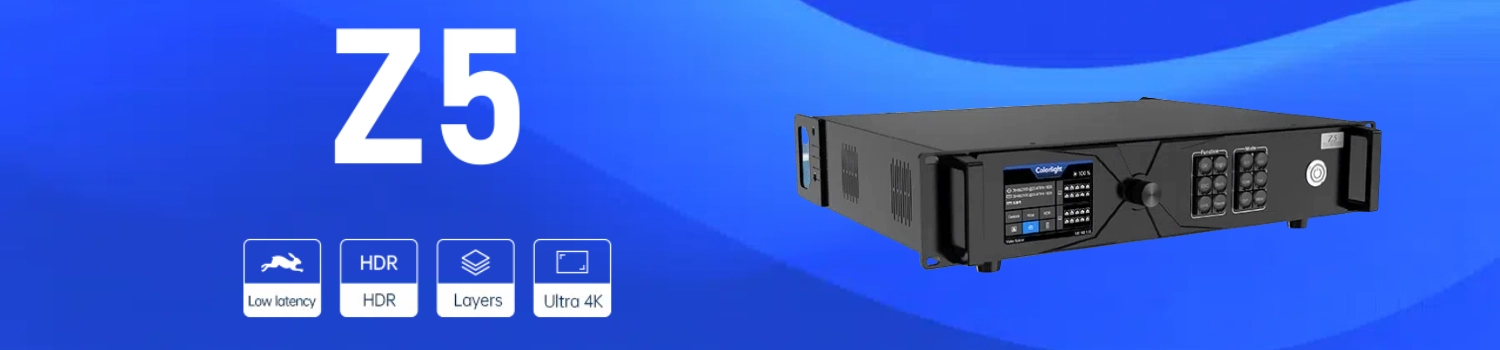
The Colorlight Z5 is a professional LED video controller made for high-demand visual work. It focuses on ultra-low latency, HDR support and accurate color. Many teams choose the Colorlight Z5 LED video controller for live events, broadcast, television and film production.
Table of Contents:
1. Colorlight Z5 Overview
2. Colorlight Z5 Technical Specifications
3. Key Features of the Colorlight Z5
4. Common Applications
5. How to Connect the Colorlight Z5
6. Controlling Colorlight Z5 with iSet Software
7. Colorlight Z5 vs Z4 Pro
8. Colorlight Z5 Pricing
9. Resources Download
10. FAQs
1. Colorlight Z5 Overview
Colorlight Cloud designed the Z5 as a new generation LED video controller. It targets situations where real-time processing and color fidelity matter most. Live events, broadcast studios, television work and filming all need this kind of performance.
The Colorlight Z5 processor handles Ultra HD signals with low delay. It supports HDR and wide color gamut. These features help deliver clean, stable images on large LED displays. Users get reliable control without extra complexity.
This Colorlight Z5 LED controller works well in both fixed installations and mobile setups. It combines strong processing power with practical control options. The result is a unit that meets professional standards while staying straightforward to use.
2. Colorlight Z5 Technical Specifications
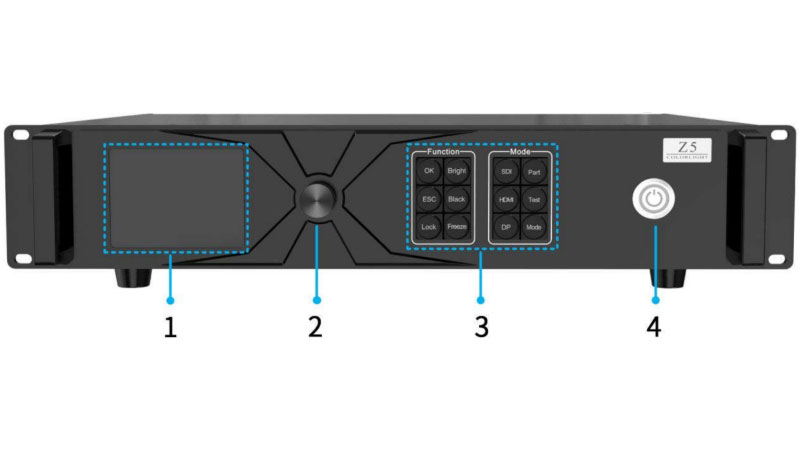
The Colorlight Z5 LED video controller is a 2U unit designed for professional use. Below are the key specs that matter most when planning a project.
| Item | Details |
| Max Load Capacity | 13.1 million pixels (8-bit @ 60Hz) |
| Max Resolution | Width up to 16384 pixels / Height up to 8192 pixels |
| Input | HDMI 2.0, DP 1.2, 12G-SDI |
| Max Input Resolution | 4096 × 2160 @ 60Hz |
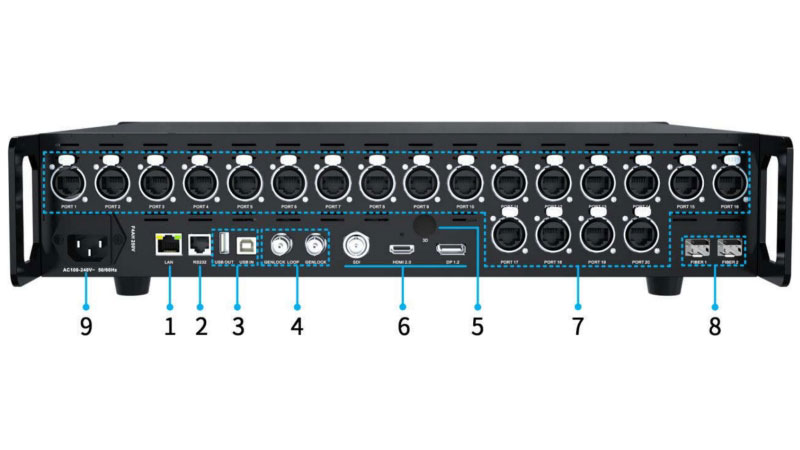
| Output | 20 × Gigabit Ethernet + 2 × 10G fiber |
| Color Depth | 8-bit / 10-bit |
| Frame Rate | 23.98Hz – 240Hz |
| Dimensions | 482.6 × 88.0 × 407.1 mm (2U) |
| Net Weight | 5.85 kg |
| Power Consumption | 75W |
| Operating Temperature | -20°C to 55°C |
These numbers show the Colorlight Z5 processor can drive large LED walls while staying compact enough for standard racks. The 20 Ethernet ports plus dual fiber options give flexibility for both short and long-distance setups.
3. Features
The Colorlight Z5 LED video controller focuses on practical performance for professional use. Below are its main features.
(1) Full 4K Input & Ultra 4K Load Capacity
The Colorlight Z5 supports 4K@60Hz inputs across HDMI 2.0, DisplayPort 1.2, and 12G-SDI interfaces, for compatibility with professional cameras, media servers, and broadcast systems. With a maximum resolution of 4096×2160 and custom resolutions up to 8192×1080 (width) or 1080×8192 (height), it effortlessly handles ultra-wide or curved LED walls. The controller’s 13-million-pixel load capacity (8bit@60Hz) empowers large-scale installations, such as stadium displays or 16K-wide video walls, delivering crisp visuals without compromise.

(2) 20-Channel Gigabit Ethernet & 10G Fiber Output
Equipped with 20 Neutrik etherCON ports, the Colorlight Z5 processor guarantees rock-solid connections even in high-vibration environments. Each port supports:
- 655K pixels at 60Hz (8bit) or 491K pixels (10bit) for detailed content.
- 327K pixels at 120Hz (8bit) for high-frame-rate applications like live sports or gaming.
For long-distance projects, the dual 10G SFP+ fiber ports (compatible with Calient H10FN modules) enable lossless transmission up to 10km, ideal for outdoor festivals or distributed signage. Fiber 1 mirrors Ports 1–10, while Fiber 2 covers Ports 11–20, for seamless scalability.

(3) Multi-Window Display & Flexible Layouts
The Z5 supports three independent windows on a single canvas, allowing simultaneous display of live feeds, graphics, and videos. Users can:
- Crop, scale, or stitch sources in real time.
- Drag-and-drop windows for dynamic layouts, perfect for live events or interactive exhibitions.
- Enable window roaming to highlight specific content zones without interrupting the overall display.
(4) Ultra-Low Latency & Genlock Synchronization
With a 1-frame delay (as low as 16ms at 60Hz), the Colorlight Z5 LED Controller provides seamless playback for live broadcasts, concerts, and esports. Its Genlock sync (via BNC input/loop-out) eliminates tearing in multi-controller setups, critical for broadcast studios or synchronized stage screens. Simply daisy-chain multiple Z5 units or sync with external devices like cameras for frame-perfect alignment.
(5) HDR10/HLG & 10-Bit Color Precision
Experience cinematic quality with HDR10/HLG support, offering 1,000+ nits brightness and a 1.07-billion-color palette. The 10-bit processing reduces banding in gradients, while wide color gamut (WCG) ensures vivid, true-to-life hues—ideal for film production, luxury retail displays, or HDR live streams.

(6) Web-Based Control & Virtual Pixel Technology
Manage the Z5 effortlessly through its browser-based interface (no software install required). Adjust brightness, switch inputs, or save layouts remotely—compatible with Windows, macOS, and Linux. Additionally, 3x/4x virtual pixel modes enhance image sharpness on fine-pitch LED screens, turning lower-resolution content into stunning visuals.

(7) Industrial Reliability & Redundancy
Built for 24/7 operation, the Z5 features:
- Neutrik connectors for dust-proof, secure cabling.
- Dual power redundancy (optional) and a built-in fuse for surge protection.
- Network port grouping to maintain partial functionality even during hardware failures.
4. Common Applications
The Colorlight Z5 is mainly used in the following situations:
✔ Live events and concerts
The Colorlight Z5 LED video controller drives large stage LED walls. Low one-frame delay keeps the video in sync with live performance. Multi-window support allows camera feeds and graphics to show at the same time.
✔ Broadcast studios and television production
Genlock helps lock multiple screens and cameras together. HDR10 and HLG support improve contrast and color for on-air content. The Colorlight Z5 processor handles these needs reliably.
✔ Film and television shooting
Accurate color adjustment tools and high load capacity make it suitable for LED volumes. Latency stays low enough for real-time monitoring on set.
✔ Large fixed installations
Command centers, exhibition halls and similar projects use the Colorlight Z5 for its 20 Ethernet ports and dual fiber options. These give flexibility for different screen sizes and cable runs.
5. How to Connect the Colorlight Z5?
Connect all cables before turning on the power. This is the basic rule for the Colorlight Z5.

Start with the video inputs. Plug your sources into the HDMI 2.0, DP 1.2 or 12G-SDI ports on the rear panel.
For the LED display, you have two choices. Use the 20 Gigabit Ethernet ports with normal network cables, or use the two 10G fiber ports with SFP+ modules and fiber transceivers. Fiber 1 covers ports 1-10 and Fiber 2 covers ports 11-20.
Connect control cables next. Use the LAN port for network control, USB for cascading or PC connection, and RS232 if you need third-party control. Plug in a genlock source if you want external sync.
Finally, connect the power cable and turn the unit on from the front panel.
Once the cables are in place, the Colorlight Z5 is ready for software setup.
6. Controlling Colorlight Z5 with iSet Software
The Colorlight Z5 works with iSet software. Use version 6.0 or higher. Download it from the LedInCloud – LED Screen Cloud Platform before you start.
Step 1: Detect the device
Open iSet and click Detect devices. The software will search for the Colorlight Z5 and show its information. If the device does not appear, check the network or USB connection.

Step 2: Set the canvas
Go to the Video Source page. Right-click the canvas area and choose Canvas size settings. Set the width and height according to your LED screen. The maximum width is 8192 pixels. All windows will stay inside this canvas.

Step 3: Add windows
Click the + button or drag a signal source onto the canvas to create a window. You can add up to three windows. One window can display a 4K signal and the other two can display HD signals. Drag the borders to change the size and position of each window.

Step 4: Crop and adjust signals
Right-click a signal source and select Crop if you need to cut part of the image. You can also set EDID, change the output frame rate, and select 8-bit or 10-bit color depth in the same area.

Step 5: Adjust picture and HDR
Open the Control page. Here you can change brightness, color temperature, hue, saturation and contrast. Turn HDR on or off if your content supports it. Test patterns are also available for screen checking.

Step 6: Set the cabinet layout
Go to the Layout page. Select the correct output port, then add cabinets to match your actual LED wall. Set the connection mapping by clicking the cabinets in order. When the mapping is correct, click Save mapping.

After these steps the Colorlight Z5 is ready for normal use. Most daily adjustments can be done from the Video Source and Control pages.
7. Colorlight Z5 vs Z4 Pro
The Colorlight Z5 and Z4 Pro share the same design concept and most features. The main differences are in load capacity and output ports.
| Item | Colorlight Z5 | Colorlight Z4 Pro |
| Max Load Capacity | 13.1 million pixels | 6.55 million pixels |
| Ethernet Ports | 20 × Gigabit | 10 × Gigabit |
| Fiber Ports | 2 × 10G | 1 × 10G |
| Net Weight | 5.85 kg | 5.40 kg |
| Rated Power | 75W | 70W |
Both models support the same inputs (HDMI 2.0, DP 1.2, 12G-SDI), the same maximum input resolution (4096×2160@60Hz), the same processing functions (3 windows, one-frame latency, HDR10/HLG, Genlock), and the same control methods.
If you need higher load capacity and more output ports, choose the Colorlight Z5.
If your screen is smaller and you want a slightly lighter unit, the Z4 Pro is enough.
8. Colorlight Z5 Pricing
The Colorlight Z5 LED Video Controller is priced at approximately $3,650. Specific prices vary by region and dealer. Please contact LedInCloud for volume discounts.
Register LedInCloud also allows you to self-check other controller prices for comparison, helping you make better decisions.
9. Resources Download
Get the complete guide to operating your Z5 LED controller, including safety guidelines, hardware connections, and software configuration.
How to download?
- Visit Colorlight Software Download.
- Search for “Colorlight Z5 Manual” or other files.
- Click for instant access.
10. FAQs
Q1. What is the maximum load capacity of the Colorlight Z5?
It reaches 13.1 million pixels at 8-bit and 60Hz. At 10-bit or higher frame rates, the capacity is lower.
Q2. What software do I need to control the Colorlight Z5?
You need iSet version 6.0 or higher. Older versions may not detect the device properly.
Q3. Does the Colorlight Z5 support HDR?
Yes. It supports both HDR10 and HLG. Some advanced color functions work better with i9 or newer receiving cards.
Q4. Can I display more than one signal at the same time?
Yes. The Colorlight Z5 supports up to three windows. One can be 4K and the other two can be HD.
Q5. What is the difference between the Ethernet ports and the fiber ports?
The 20 Ethernet ports connect directly to receiving cards with network cables. The two 10G fiber ports are used with SFP+ modules and fiber transceivers for longer distances. Fiber 1 copies ports 1-10, while Fiber 2 copies ports 11-20.
11. Conclusion
The Colorlight Z5 LED Video Controller redefines what’s possible in professional AV control. From its 4K-ready inputs and Genlock synchronization to industrial-grade reliability, it’s the ultimate solution for demanding applications like live events, broadcast studios, and architectural displays. With competitive pricing and unmatched flexibility, the Z5 empowers creators to deliver unforgettable visual experiences.