

NovaStar MCTRL660 Pro Review: Specs, Price and How to Configure
The NovaStar MCTRL660 Pro is a professional LED display controller. It supports input resolutions up to 1920×1200@60Hz and drives up to 3.9 million pixels at 8-bit. It also works as both a sending card and a fiber converter, so one unit covers two jobs in your signal chain.
This guide covers the specifications, features, price, and a comparison with the MCTRL600, MCTRL660, and MCTRL700. It also walks through quick screen configuration and lists the official manual and firmware downloads.
1. What Is the NovaStar MCTRL660 Pro?
The NovaStar MCTRL660 Pro is a standalone LED display controller. It takes a video signal from your HDMI, DVI, or 3G-SDI equipment, and sends it to the receiving cards inside each LED cabinet. The path out is either six Gigabit Ethernet ports or two 10G fiber ports, so the same controller fits both short runs and long-distance fiber links.
Most controllers do one job. This one does two. In sending card mode, it pushes video to the screen like any other controller. In fiber converter mode, it converts between optical and electrical signals. So if your control room sits 2 kilometers from the screen, you don’t need a separate converter box. The same unit switches roles from the front-panel menu.
2. MCTRL660 Pro Specifications
The table below collects the key numbers from the official specification sheet. For the complete document, see the PDF in Section 8.
| Item | Specification |
| Input | 1× SL-DVI (1920×1200@60Hz, HDCP 1.3), 1× HDMI 1.4a (1920×1200@60Hz, HDCP 1.4), 1× 3G-SDI (1920×1080@60Hz) |
| Loop out | DVI, HDMI, 3G-SDI loop-through |
| Output | 6× Gigabit Ethernet (650,000 px/port at 8-bit, 3.9M px total), 2× 10G optical (single-mode 10 km, multimode 300 m) |
| Loading at 10/12-bit | 325,000 px per port, 1.95M px total (halved) |
| Control | Ethernet (web UI), USB Type-B IN / Type-A OUT, cascade up to 8 units |
| Sync | GENLOCK IN-LOOP (Bi-Level, Tri-Level, Black burst) |
| Power | 100 V–240 V AC, 20 W |
| Working environment | –20°C to +60°C, 10%–90% RH non-condensing |
| Size / weight | 482.6 × 356.0 × 50.1 mm (1U, horizontal mounting only) / 4.6 kg |
| Certifications | FCC, CE, RoHS, IC, UL & CUL, CB, PSE, RCM |
| Accessories | Power cord, Ethernet cable, USB cable, HDMI cable, DVI cable |
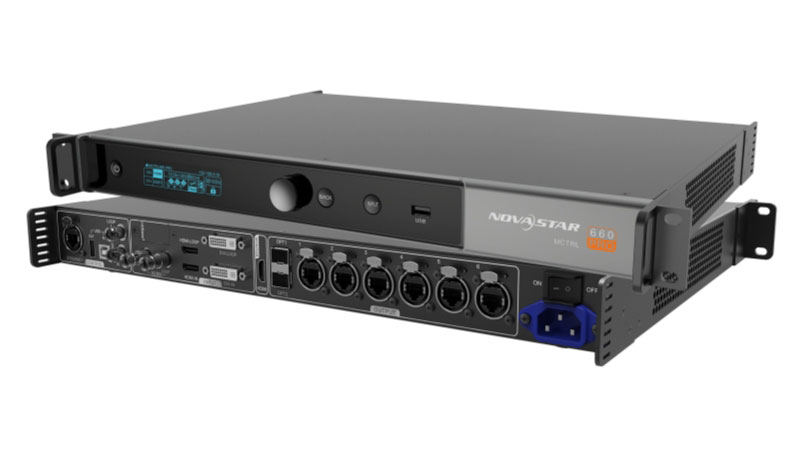
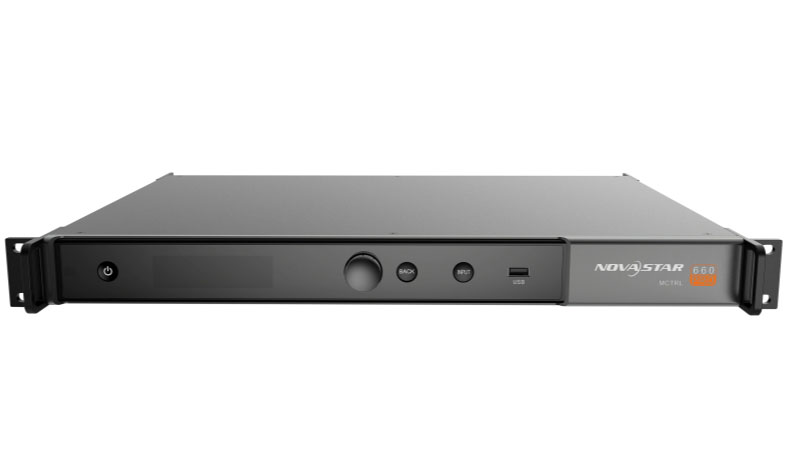
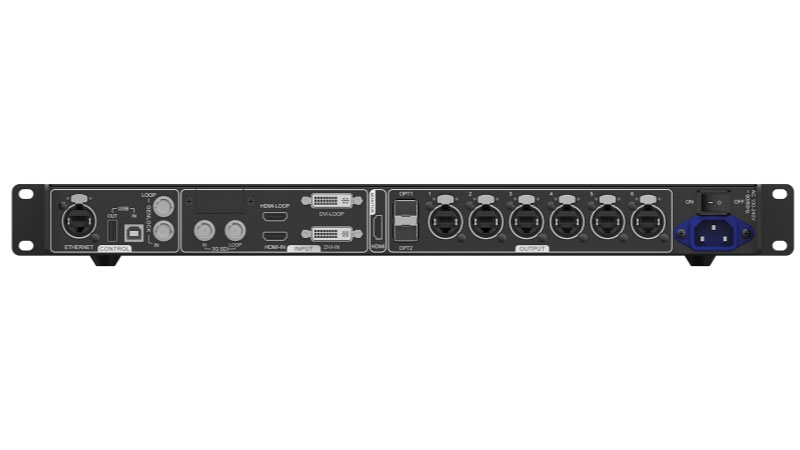
The loading row deserves a note. At 8-bit, each Gigabit port carries 650,000 pixels, and all six together carry 3.9 million. Switch the source to 10-bit or 12-bit, and the capacity drops by half. So a deep-color show changes your cabinet count, and you should run the math before you commit. A single 10G optical port carries the same load as all six Gigabit ports combined, with OPT2 as its backup.
Custom resolutions are flexible too. HDMI and DVI accept widths up to 3840 pixels (3840×600@60Hz) or heights up to 3840 pixels (800×3840@30Hz), which covers ultra-wide and ultra-tall screens without extra hardware.
3. NovaStar MCTRL660 Pro Features
Specs show what fits in the rack. Features show what the controller does in daily work.
3.1 More Ports, Longer Distance
The controller outputs through six Gigabit Ethernet ports and two 10G fiber ports.
More ports means more cabinets on one box.
And fiber changes the distance game: single-mode runs reach 10 km, multimode 300 m. If your control room sits far from the screen, a standard controller needs extra converters, but the MCTRL660 Pro handles the run by itself.
It also keeps a spare path ready, because the Ethernet ports back each other up and OPT2 backs up OPT1.
3.2 One Box, Two Roles
Normally a long fiber run needs a sending device at one end and a fiber converter at the other. That means two products to buy, carry, and maintain. This controller plays both roles. Switch it to fiber converter mode from the menu, and it becomes the receiving-side converter. One product in your fleet, two uses.

3.3 Better Image on Camera
Three image features matter when the LED wall appears on camera:
Deep color input. It accepts 10-bit and 12-bit sources, which means smoother gradients and no color banding in low-gray areas.
Separate RGB gamma. You can adjust red, green, and blue gamma on their own. This fixes two problems you have probably seen: gray areas looking patchy, and white drifting to green or magenta over time.
Low latency under 1 ms. The delay between camera and wall drops to about one frame, so lip-sync stays natural on live broadcasts. Note the limits: it needs vertical cabinet wiring, no wider than 512 pixels per port, and it cannot run with mirroring or GENLOCK.

3.4 Stage Effects Without Extra Gear
Image mirroring flips the picture left-right or top-bottom, on one port or the whole wall. Stage designers use it for symmetrical looks, and you don’t need a separate video processor to do it.
3.5 Easier Daily Operation
Three smaller features save time in normal work:
Pixel-level calibration. Cabinets from different batches look slightly different. Calibration corrects each pixel, so the whole wall reads as one panel.
One-click backup and restore. Save your configuration before the show. If something goes wrong on site, you recover it in seconds instead of rebuilding settings.
Web control. Configure the screen from a browser and watch input status in real time. Up to 8 units link together over USB.

4. MCTRL660 Pro Price
The MCTRL660 Pro is competitively priced at approximately $817. However, we recommend that users first register and log in to our LED Screen Cloud Platform. By doing so, you can access detailed pricing information for all NovaStar products, along with exclusive offers. Plus, our professional team is available to answer any questions and provide tailored support.
5. MCTRL660 PRO vs MCTRL600 vs MCTRL660 vs MCTRL700
NovaStar groups these four controllers in its 1080p resolution line, and picking between them is a common decision point. The table puts the spec numbers for all four models in one place.
| Item | NovaStar MCTRL600 | NovaStar MCTRL700 | MCTRL660 | MCTRL660 PRO |
| Video inputs | DVI, HDMI 1.3, Audio | DVI, HDMI 1.3, Audio | DVI, HDMI 1.3, Audio | 3G-SDI, HDMI 1.4a, SL-DVI |
| Gigabit Ethernet ports | 4 | 6 | 4 | 6 |
| 10G fiber output | No | No | No | 2× (OPT1/OPT2) |
| Total capacity (8-bit) | ~2.6M px | ~3.9M px | ~2.6M px | ~3.9M px |
| 10/12-bit input | Yes, 1440×900@60Hz | Not listed in spec sheet | Yes, 1440×900@60Hz | Yes, 1920×1080@60Hz |
| Front panel | Indicators only | Indicators only | LCD screen + knob | OLED screen + knob |
| Cascading | 20 units (UART) | 20 units (UART) | 20 units (UART) | 8 units (USB) |
| Light sensor port | Yes (auto brightness) | No | No | No |
| Genlock / mirroring / low latency | No | No | No | All three |
| Rated power | 6.6 W | 12 W | 16 W | 20 W |
| Weight | 2.5 kg | 2.6 kg | 3.6 kg | 4.6 kg |
Which one fits your project? It comes down to the signal source and the screen size:
MCTRL600 if the budget is tight, the install is configured once and never touched, or the screen needs automatic brightness. It is the only model here with a light sensor port.
MCTRL700 if your wall sits between 2.6M and 3.9M pixels, and six Ethernet ports are all you need.
MCTRL660 if your crew works without a laptop on site. The front LCD and knob configure a screen in about 30 seconds.
MCTRL660 PRO if any of these apply: SDI cameras, Genlock sync, fiber runs over 300 m, deep-color 10/12-bit content, or a wall beyond 2.6 million pixels. If none of them apply, a cheaper model does the same job.
6. Applications: Three Working Modes
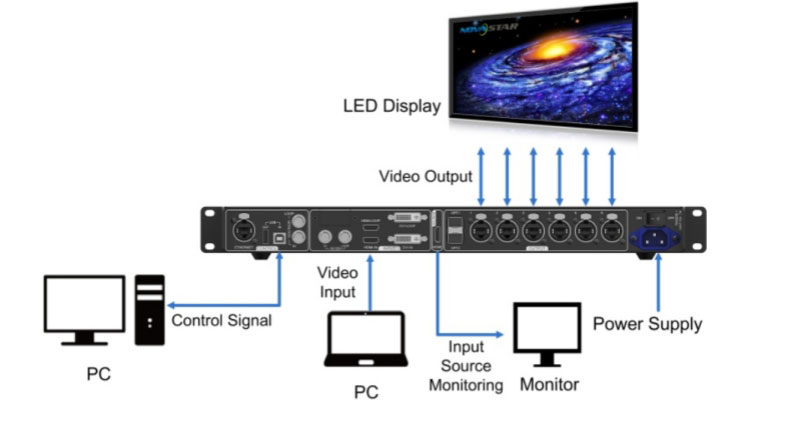
The MCTRL660 Pro handles three wiring scenarios between source and screen. All mode changes happen in the OLED menu, and none of them need tools or extra hardware.
(1) Sending Card Mode
On the OLED menu, choose Working Mode > Sending Card. The controller outputs video through either the optical ports or the six Gigabit Ethernet ports, straight to the receiving cards. This is the default setup for most screens.
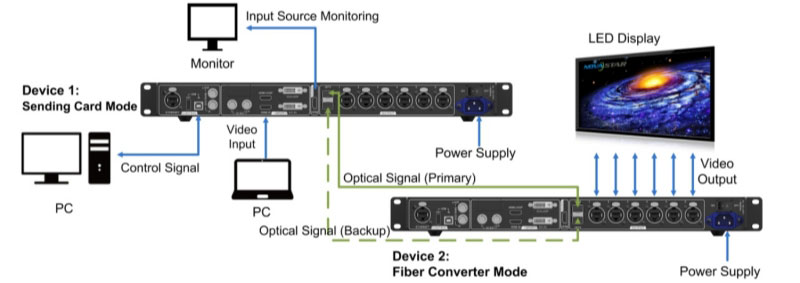
(2) Fiber Converter Mode
Set the two devices to different working modes. Device 2 then takes optical input and sends Gigabit Ethernet output, or the reverse. Because the unit converts between optical and electrical signals, it bridges a control room and a screen that sit kilometers apart.
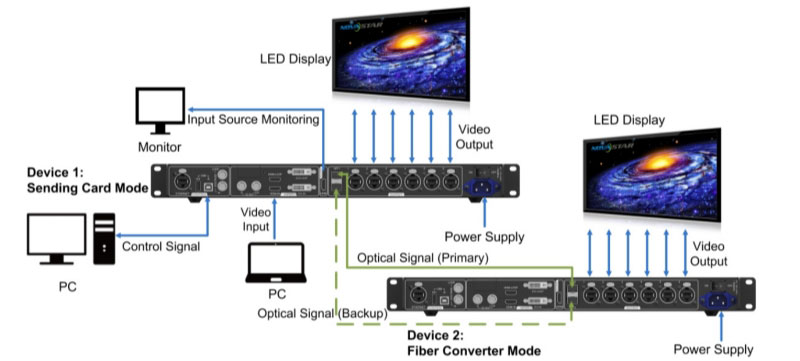
(3) Dual Output Mode
Again, set different working modes on the two devices. Device 1 drives its optical ports and Ethernet ports at the same time, so a main screen and a backup screen get identical content from one source.
7. Quick Screen Configuration
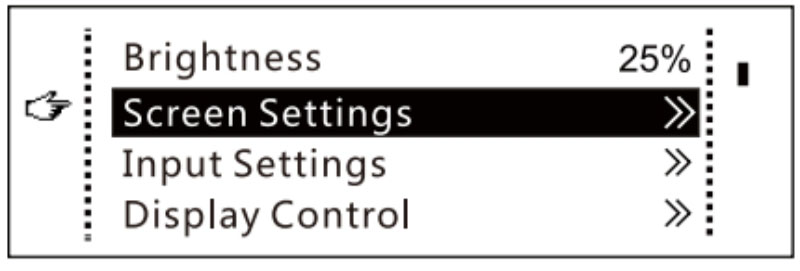
Step 1: On the home screen, press the knob to enter the menu.
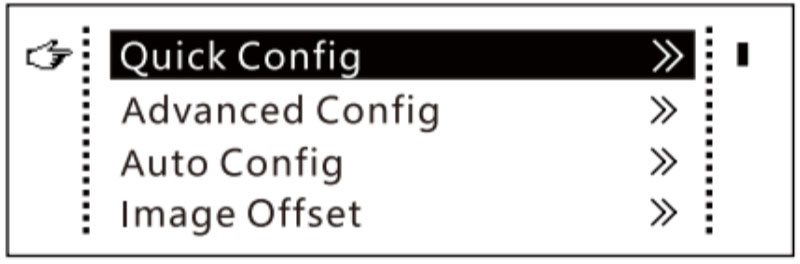
Step 2: Navigate to Screen Settings and select Quick Config to access its submenu.
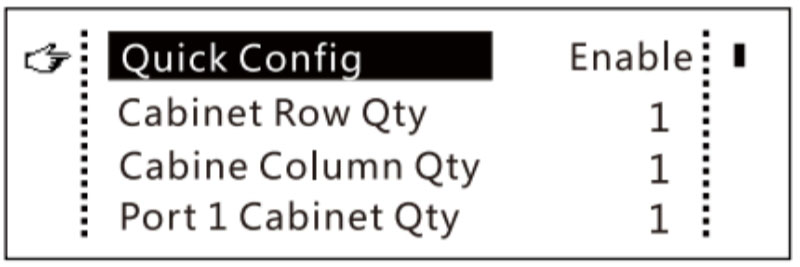
Step 3: Enable Quick Config and set the following parameters:
Cabinet Row Qty and Cabinet Column Qty: Specify the number of cabinet rows and columns to be loaded.
Port 1 Cabinet Qty: Determine the number of cabinets to be loaded by Ethernet port 1. The device has specific restrictions on how many cabinets can be loaded by each Ethernet port. For details, refer to Note a).
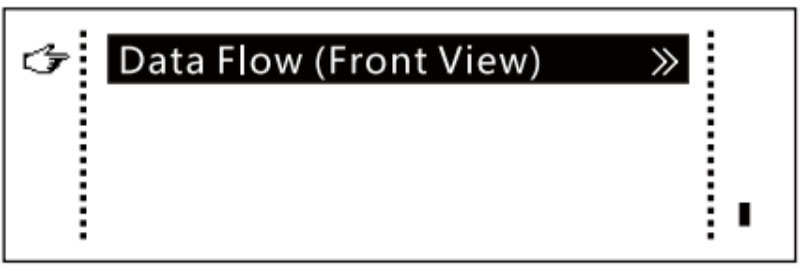
Data Flow: Set the data flow for the screen. Refer to Notes c), d), and e) for more information.
Note:
a. If multiple ports are used to load the screen, the number of cabinets loaded by each of the first (n−1) ports must be identical and should be an exact multiple of the total number of cabinet rows or columns. Additionally, the number of cabinets loaded by the last port must not be less than those loaded by the other ports.
Example: If all six Ethernet ports are used to load the screen, ports 1–5 must load the same number of cabinets, which should be an exact multiple of the total number of cabinet rows or columns. You only need to set the number of cabinets for port 1 accordingly. Port 6 should load fewer or equal cabinets compared to port 1.
b. Irregular screens must be configured in NovaLCT.
c. Rotate the knob to select the desired data flow direction, which can be previewed on the LED screen in real-time. Press the knob to save your selection.
d. Confirm that the cabinets loaded by each Ethernet port are connected sequentially in the same direction.
e. Ensure that Ethernet port 1 starts at the beginning position of the entire physical connection.
8. MCTRL660 Pro Manual and Software Downloads
Official documents for this controller are free here:
Software is also part of the setup. The Novastar software download page collects the latest NovaLCT and SmartLCT versions. For cabinet configuration files, check the NovaStar RCFG file download library. Firmware updates install over USB from the front panel, or through NovaLCT on a PC.
9. FAQs
Q1. What is the maximum resolution of the NovaStar MCTRL660 Pro?
1920×1200@60Hz over HDMI or DVI at 8-bit. At 10/12-bit, it drops to 1920×1080@60Hz.
Q2. How many pixels can the MCTRL660 Pro load?
3.9 million pixels at 8-bit (650,000 per port), or 1.95 million at 10/12-bit. A single 10G optical port matches all six Gigabit ports combined.
Q3. Can the MCTRL660 Pro handle long-distance transmission?
Yes. The 10G fiber ports reach 10 km over single-mode fiber or 300 m over multimode. In fiber converter mode, it converts optical back to Ethernet at the screen end.
Q4. Is the MCTRL660 Pro suitable for irregular LED screens?
Not through the front panel. Irregular screens must be configured in NovaLCT on a PC.
Q5. What is the difference between the MCTRL660 Pro and the MCTRL660?
The Pro adds 3G-SDI input, Genlock, two 10G fiber ports, mirroring, low latency, and higher 10/12-bit resolution. If you need none of those, the standard MCTRL660 costs less.
10. Conclusion
The NovaStar MCTRL660 Pro combines a sending card, a fiber converter, and an image processor in one 1U unit. It loads 3.9 million pixels, keeps live work within one frame of delay, and configures a screen from the front panel without a computer. It makes sense when your project needs SDI input, Genlock, long fiber runs, or more than 2.6 million pixels. Otherwise, a cheaper model in the line does the job.
To check the current price or compare models, visit our LED Screen Cloud Platform or contact us.