
Colorlight LED Controllers: Models, Comparison and Buying Guide
A Colorlight LED controller lineup covers different screen sizes and project needs, from small retail displays to large stadium walls. The key is knowing which sender and receiving card fit your actual requirements. This guide introduces the main Colorlight LED control system models, compares their core differences, and helps you quickly find the right combination for your project.
1. Introduction
A Colorlight LED control system sits at the heart of any LED display. It takes video signals, processes them, and drives the panels so the picture stays clear and stable. Before we look at specific models, it helps to understand why Colorlight has become a common choice for many projects.
1.1 What Makes Colorlight a Leader?
Colorlight LED started in China and has grown into a global provider of LED control systems. The company focuses on reliable hardware and practical software that work in real-world conditions. Their products handle outdoor stadiums, indoor studios, and everything in between.
Unlike basic controllers, a Colorlight LED control system scales easily. It supports small digital signs as well as large video walls. Users can choose from different senders, receiving cards, and accessories to match their project size and budget.
1.2 Why LED Controllers Matter?
An LED controller acts as the brain of the display. It takes the video signal, processes it, and sends the right data to each panel. When the controller works well, every pixel shows the correct color and brightness.
A weak controller can cause problems. Signal delays make audio and video fall out of sync. Pixel errors create dead spots or color mismatches. System crashes can black out the screen during live events.
Colorlight addresses these issues with built-in redundancy and stable software. The S20 sender supports dual-device backup. Many receiving cards, such as the E320 series, use loop backup to keep the signal flowing if one cable fails. These features help keep the screen running when reliability matters most.
2. Top Colorlight LED Control System Models
Colorlight’s product lineup covers different screen sizes and project needs. Below we break down the main models across senders, receiving cards, accessories and software.
2.1 LED Senders
Senders act as the central hub, converting video inputs into signals for LED displays.
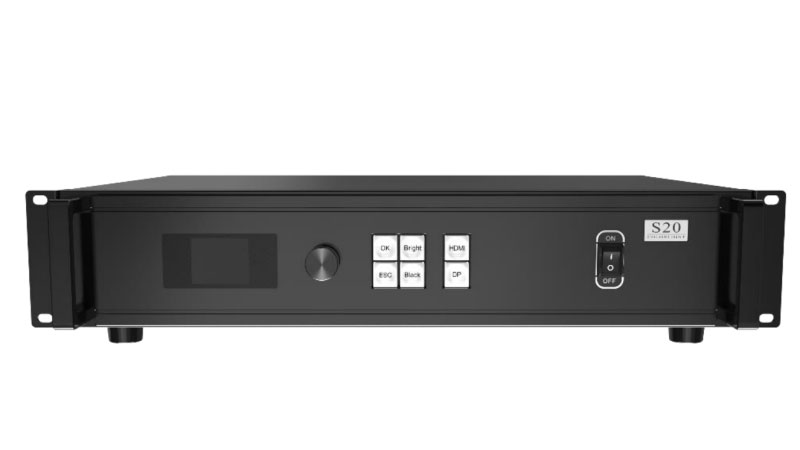
(1) Colorlight S20/S20F
Key Features:
- HDMI 2.0 and DP 1.2 inputs up to 4096×2160@60Hz
- Loading capacity up to 8.85 million pixels
- Maximum width or height of 8192 pixels
- S20: 20 Gigabit Ethernet ports
- S20F: 4 optical fiber ports (2 active + 2 standby) at 10Gb/s
- Ethernet port redundancy and controller redundancy
- Separate audio input and output
- Optional 3D support
Unique Advantage:
Seamless source switching and dual-backup design keep the screen running even if one path fails.
Best For:
Stadiums, large outdoor walls, and live events that need high pixel capacity and stable long-distance signal delivery.
(2) Colorlight S6F/S54/S2
Key Features:
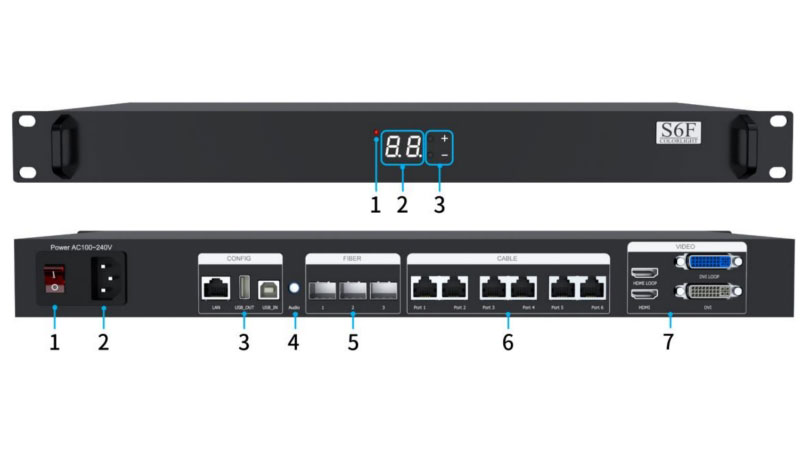
- S6F: HDMI + DVI with loop, 6 Gigabit ports + 3 optical fiber outputs
- S4: HDMI + DVI + HDMI loop, 4 Gigabit ports
- S2: DVI input, 2 Gigabit ports (PCI-E card or box version)
- Loading capacity: S6F and S4 up to 2.3 million pixels, S2 up to 1.31 million pixels
- Maximum width 4096 pixels or height 2560 pixels (S6F/S4)
- Brightness and color temperature adjustment
- Better grayscale at low brightness
- USB cascading supported
Unique Advantage:
Hybrid Ethernet and fiber outputs on the S6F give flexible long-distance options in a compact design.
Best For:
Shopping mall displays, control rooms, and mid-sized fixed installations.
✔ Colorlight LED Sender Comparison Table
| Feature | S2 Sending Card | S2 Controller | S4 | S6F | S20 | S20F |
| Loading Capacity | 1.31 million pixels | 1.31 million pixels | 2.3 million pixels | 2.3 million pixels | 8.85 million pixels | 8.85 million pixels |
| Max Width / Height | 2560 px | 2560 px | 4096 px (W) / 2560 px (H) | 4096 px (W) / 2560 px (H) | 8192 px | 8192 px |
| Video Inputs | 1× DVI | 1× DVI | 1× HDMI + 1× DVI + HDMI loop | 1× HDMI + loop + 1× DVI + loop | 1× DP 1.2 + 1× HDMI 2.0 | 1× DP 1.2 + 1× HDMI 2.0 |
| Max Input Resolution | 1920×1200 | 1920×1200 | 1920×1200 | 1920×1200 | 4096×2160@60Hz | 4096×2160@60Hz |
| Network / Fiber Outputs | 2× Gigabit Ethernet | 2× Gigabit Ethernet | 4× Gigabit Ethernet | 6× Gigabit Ethernet + 3× optical fiber | 20× Gigabit Ethernet | 4× 10G optical (2 active + 2 standby) |
| Power | DC 3.8–5.5V or PCI-E 12V / 6W | AC 100–240V / 15W | AC 100–240V / 20W | AC 100–240V / 20W | AC 100–240V / 40W | AC 100–240V / 40W |
| Size & Weight | 135×102 mm / 100g (PCI-E card) | 275×198×44 mm / 2.1 kg | 1U / ≈2 kg | 1U / ≈2 kg | 2U / 5.1 kg | 2U / 5.1 kg |
| Key Extra Features | Dual USB cascading, better low-brightness gray, multi-screen control | Front brightness buttons (16 levels), audio input, test patterns | HDCP support, brightness & chromaticity adjust, USB cascading | Fiber for long runs, LAN control, EDID setting | Seamless source switch, port/controller redundancy, optional 3D, audio in/out | Same as S20 + fiber redundancy, 10 Gb/s optical links |
2.2 LED Receiving Cards
Receiver cards decode signals and control individual LED panels.
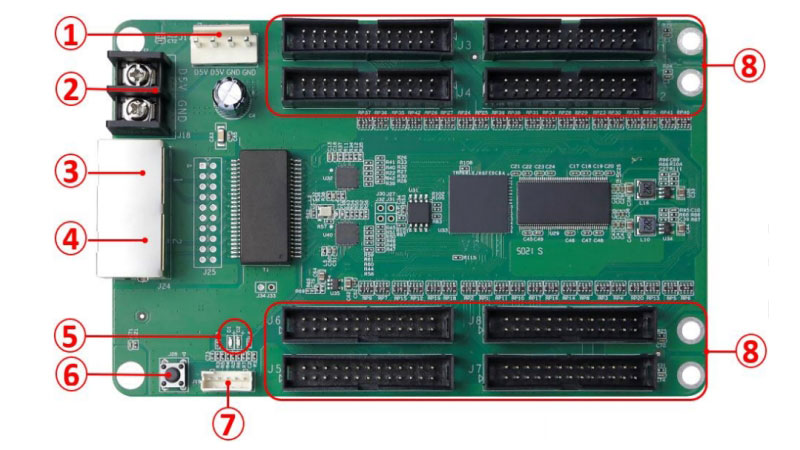
(1) E320Pro/E320
Key Features:
- Loading capacity up to 512×512 pixels
- 40 parallel data groups on the Pro version
- 8bit and 10bit video sources
- 240Hz high frame rate
- Loop backup with dual Ethernet ports
- Temperature and voltage monitoring
- HDR10 support on the Pro model
Unique Advantage:
Higher load capacity and more data groups while keeping reliable loop-backup design.
Best For:
Mid to high-end fixed screens and stage backdrops that need stable performance without the highest fine-pitch cost.
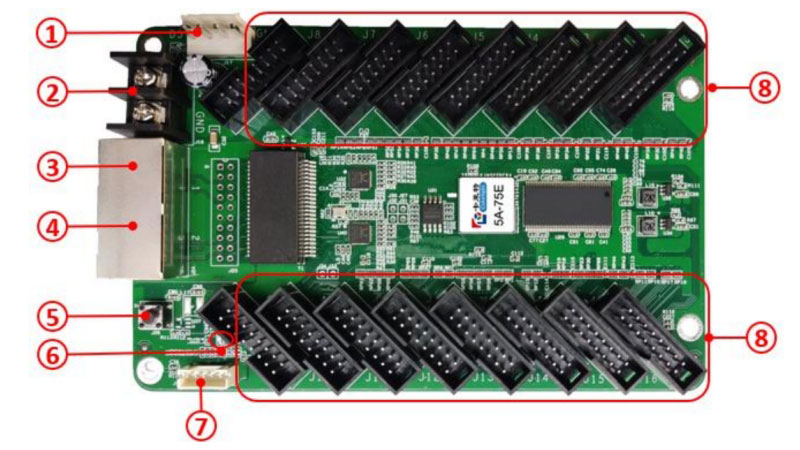
(2) 5A-75E/5A-75B
Key Features:
- 5A-75E: up to 256×1024 pixels, 32 parallel data groups
- 5A-75B: up to 192×1024 pixels, 16 parallel data groups
- Integrated HUB75 interface
- 8bit video source and better gray at low brightness
- Pixel-level brightness and chroma calibration
- Cabinet highlight and OSD
- Loop redundancy and firmware redundancy
Unique Advantage:
Lightweight design (around 94g) and direct HUB75 connection make installation simple for standard modules.
Best For:
Fixed installations such as conference room displays, retail signage and digital menu boards.
(3) 5G Series (RV5000/HC5)
Key Features:
- 5Gb/s high-speed transmission
- Loading capacity up to 384×1024 or higher
- 12bit color depth
- Infi-bit grayscale extension
- Grayscale refinement and independent RGB Gamma adjustment
- HDR10 / HLG support
- Advanced softedge and multi-grayscale calibration
- High frame rate up to 240Hz
- SHUTTERLOCK for camera matching
- Parameter and calibration coefficient redundancy
- Firmware upgrade without power restart
Unique Advantage:
One cable carries much more data than standard Gigabit links, reducing cabling while improving color depth and low-gray detail.
Best For:
High-end fixed screens, stage rental, and broadcast applications that need fewer cables and accurate color.

(4) K Series (K10/K8/K5+)
Key Features:
- Designed for fine-pitch cabinets
- Loading capacity around 512×384 pixels
- 12bit color depth, Infi-bit, and grayscale refinement
- Independent RGB Gamma and gamut adjustment
- HDR10 / HLG support
- Advanced softedge and multi-grayscale calibration
- Low latency
- High frame rate up to 240Hz
- SHUTTERLOCK
- Dual card hot backup (K5+)
- Cabinet temperature, humidity, voltage and power monitoring
Unique Advantage:
Small form factor with high-density connectors and full cabinet monitoring fit tight fine-pitch cabinets.
Best For:
Fine-pitch fixed installations and high-end rental screens.

(5) E120/E80
Key Features:
- E120: up to 512×512 pixels, 24 parallel data groups
- E80: up to 128×1024 pixels
- 8bit video source
- Better gray at low brightness
- Pixel-level brightness and chroma calibration
- Cabinet highlight, OSD and image rotation
- Loop redundancy and firmware redundancy
Unique Advantage:
Solid load capacity with basic calibration and redundancy at a competitive price.
Best For:
Standard fixed installations and projects that need reliable everyday performance.

✔ Colorlight Receiving Cards Comparison Table
| Model | Max Load Capacity | Parallel / Serial Data Groups | Key Display Features | Special Strengths | Best For |
| E80 | 128×1024 (PWM) / 64×1024 (normal) | 16 parallel / 32 serial | 8bit, 240Hz, better low-brightness gray | Low cost, HUB75 integrated | Small to medium fixed screens |
| 5A-75B | 192×1024 (PWM) / 128×1024 (normal) | 16 parallel / 32 serial | 8bit, 240Hz, better low-brightness gray | Cost-effective HUB75, reliable | Budget projects, basic fixed installs |
| 5A-75E | 256×1024 (PWM) / 128×1024 (normal) | 32 parallel / 32 serial | 8bit, 240Hz, better low-brightness gray | Higher parallel data, HUB75 | Medium screens needing more data groups |
| E120 | 512×512 (PWM/SHIXIN) / 256×512 (common) | 24 parallel / 32 serial (up to 128) | 8bit, 240Hz, better low-brightness gray | Good balance of load and cost | Mid-range fixed or rental cabinets |
| E320 Pro | Up to 512×512 | 40 parallel / 120 serial | 8bit/10bit, HDR10, Infi-bit, low latency, 240Hz | High data groups, temperature/voltage monitoring | Fine-pitch screens needing more parallel data |
| K5+ | 512×384 (PWM) / 512×256 (normal) | 32 parallel / 32 serial (up to 128) | 8bit, 240Hz, better low-brightness gray | Small size, dual card backup, smart modules (up to 8) | Fine-pitch rental & fixed cabinets |
| K8 | Up to 512×384 | 32 parallel / 64 serial | 8bit/10bit, HDR, Infi-bit, low latency, 14bit calibration | Seam correction, color gamut, irregular modules | High-end fine-pitch rental |
| K10 | Similar high fine-pitch capacity | 32 parallel / 64 serial | 8bit/10bit/12bit, HDR10/HLG, multi-layer calibration, Infi-bit | Advanced calibration, up to 16 smart modules | Premium fine-pitch fixed & rental |
| RV5000 | 512×512 (Infi-bit) or 1024×384 (low latency) | 32 parallel / 64 serial | 8bit/10bit/12bit, HDR10/HLG, 14bit calibration, 5Gb/s | 5G Type-C ports, high frame rate, reduced cabling | High-end small-pitch fixed & flexible rental |
| HC5 | Up to 3.25 million pixels per cable (5G) | High (supports advanced features) | 8bit/10bit/12bit, HDR, multi-layer & low-gray calibration, Infi-bit | 5Gb/s transmission, up to 16 smart modules | Premium fine-pitch, broadcasting, stage rental |
2.3 Accessories
Accessories extend the reach and monitoring ability of a Colorlight LED control system.
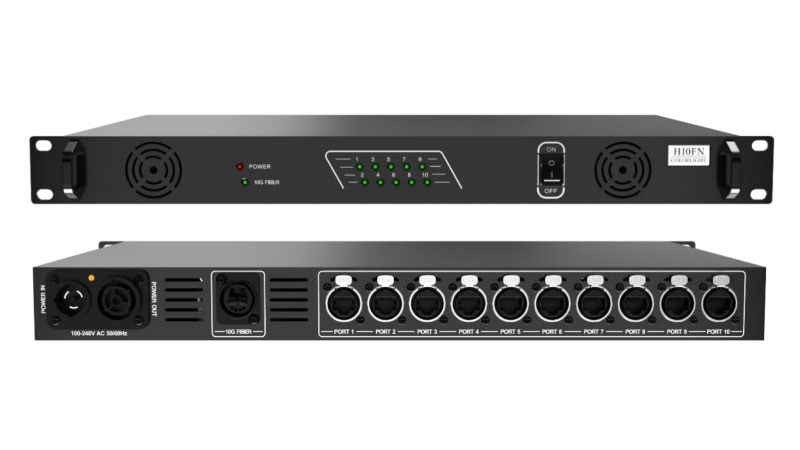
(1) Optical Fiber Transceiver (H10FN)
Key Features:
- 1× Neutrik opticalCON fiber port at 10Gb/s
- 10× Neutrik etherCON fiber ports at 1Gb/s
- Two working modes: Standalone Mode and Paired Mode
- Real-time display of connection status
- 1RU standard rack-mount design
Unique Advantage:
Upgraded Neutrik connectors improve transmission reliability over long distances.
Best For:
Large venues that need stable long-distance signal transmission between the sender and the screen.
(2) Monitoring Accessories (iM9)
Key Features:
- Power management with 8 relays for remote on/off control of screens, air conditioners and fans
- Automatic brightness adjustment with a brightness sensor
- Temperature and humidity monitoring with automatic cooling control
- Environment monitoring (noise, air quality, temperature and humidity)
- Timing control for scheduled brightness and power changes
Unique Advantage:
One set of accessories handles power, brightness and environment control from a single platform.
Best For:
Outdoor screens and 24-hour installations that need automatic environment and power management.

2.4 Softwares
Colorlight provides dedicated software for screen setup and firmware management.
(1) LEDSetting
Key Features:
- Device detection for senders and receiving cards
- Screen parameter configuration and mapping
- Brightness and chroma calibration
- Support for multi-layer calibration and low-brightness calibration
- Accessories and smart module management
- Scheduled commands and advanced deseam functions
Unique Advantage:
All main setup and calibration tasks stay in one software interface.
Best For:
Daily screen configuration, mapping and calibration work.

(2) LEDUpgrade
Key Features:
- Firmware upgrade for receiving cards, senders and multi-function cards
- Firmware readback from receiving cards
- Font library writing for receiving cards
- LOGO and font writing for sender and cabinet LCD panels
- Support for smart modules and play boxes
- Upgrade log recording
Unique Advantage:
Safe and centralized firmware management for the whole Colorlight LED control system.
Best For:
Firmware updates and maintenance of senders, receiving cards and related hardware.

3. How Does a Colorlight LED Control System Work?
A Colorlight LED control system has three main parts: the sender, the receiving cards, and the LED modules. The system turns a video signal into a complete picture on the screen.

① Video Signal Enters the Sender
The video source connects to the Colorlight LED controller. Common sources include computers, media players, or cameras. Connections use HDMI, DP, or DVI. The sender receives the signal and processes it. It handles brightness, color temperature, and other basic adjustments.
② Sender Converts and Distributes Data
The sender turns the video into data packets. It then sends the data through Gigabit Ethernet ports or optical fiber ports. Optical fiber works better for long distances. Redundancy features keep the signal stable if one path fails.
③ Receiving Cards Process the Data
Each Colorlight receiving card sits inside an LED cabinet. It takes only the data for its own section of the screen. The card then drives the connected LED modules. It controls brightness, color, and which LEDs turn on.
④ LED Modules Display the Image
The LED modules light up according to the instructions from the receiving cards. Together they form the full image across the screen.
⑤ Software for Setup and Control
Software such as LEDVISION or iSet lets you set the screen layout, adjust parameters, and monitor the system. You can also load calibration data or update firmware from a computer.
This clear chain — source to sender to receiving cards to modules — keeps the Colorlight LED control system stable and easy to manage.
4. Applications of Colorlight LED Controllers
Colorlight LED control systems appear in many different projects. The same core hardware can adapt to different environments when users choose the right combination of sender and receiving cards.

✔ Live Events and Concerts
Stage screens need to stay stable under pressure. Large pixel loads and dual-controller backup make the S20 and S20F common choices for main backdrops. For fine-pitch rental cabinets, many teams prefer the K series or 5G series receiving cards because they support higher color depth and faster frame rates.
✔ Sports Stadiums
Stadium screens often run for hours without a break. Dual backup on the sender and loop backup on the receiving cards reduce the chance of a full blackout. Outdoor projects also pair the system with monitoring accessories so brightness can change automatically with the ambient light.
✔ Retail and Advertising
Shopping malls and store windows usually use mid-sized screens. The S6F or S4 sender paired with 5A-75E or E320 receiving cards covers most of these needs. Automatic brightness control keeps the picture readable in daylight and lowers power use at night.
✔ Broadcast Studios and Control Rooms
Studios care about color accuracy and low latency. Higher-end receiving cards such as the K series and 5G series support 12-bit color, HDR, and high frame rates. These options help the screen stay clean when cameras are pointed at it.
Different projects simply call for different levels of capacity, redundancy, and color performance. Users match the hardware to those needs rather than forcing one model into every situation.
5. How to Choose the Right Colorlight LED Controller?
Most users can narrow down the right Colorlight LED control system by answering four simple questions.
(1) How big is the screen?
• Small screens (under 2 million pixels) → S2 or S4 sender + 5A-75E / E320 receiving cards
• Medium screens (2–5 million pixels) → S6F or S4 sender + E320 Pro / E120 receiving cards
• Large screens (over 5 million pixels) → S20 or S20F sender + matching high-capacity receiving cards
(2) How far is the signal running?
• Short distance (under 100 m) → Standard Gigabit Ethernet ports are enough
• Long distance → Choose S6F or S20F with fiber outputs, or add an optical fiber transceiver
(3) How critical is uptime?
• Retail, office, or basic fixed screens → Basic loop backup is usually enough
• Live events, stadiums, or broadcast → Look for dual-controller backup on the sender and loop backup on the receiving cards
(4) Do you need high color performance?
• Standard fixed screens → E series or Colorlight 5A series receiving cards
• Fine-pitch, camera work, or high-end rental → K series or 5G series receiving cards (12-bit, HDR, higher frame rates)
(5) Quick reference
| Project Type | Recommended Sender | Recommended Receiving Cards |
| Store signs / menu boards | S2 / S4 | 5A-75E / 5A-75B / E320 |
| Shopping mall / control room | S6F / S4 | E320 Pro / E120 |
| Stadium / large outdoor | S20 / S20F | E320 Pro or higher |
| Fine-pitch / stage rental | S20 / S20F | K series or 5G series |
| Broadcast studio | S20 / S20F | K series or 5G series |
Start with screen size, then check distance, reliability needs, and color requirements. This order usually points to the right combination without overbuying.
6. FAQs
Do I need to use Colorlight senders and receiving cards together?
Yes. Colorlight senders and receiving cards are designed to work as one system. Mixing them with other brands usually causes compatibility problems.
How far can the signal go with normal network cables?
Standard Gigabit Ethernet cables typically work up to 100 meters. For longer distances, use the fiber outputs on the S6F or S20F, or add an optical fiber transceiver.
What is the difference between S20 and S20F?
The S20 has 20 Gigabit Ethernet ports. The S20F mainly uses optical fiber ports, with 4 ports at 10Gb/s. Choose the S20F when you need longer transmission distance.
Will the whole screen go black if one receiving card fails?
Not necessarily. Many Colorlight receiving cards support loop backup. If one cable or path fails, the system can switch to the backup path and keep the rest of the screen running.
Which software should I use — LEDSetting or LEDVISION?
Use LEDSetting for screen configuration, mapping, and calibration. LEDVISION is mainly for playback and content management. Most setup work is done in LEDSetting.
Can I upgrade firmware without turning off the power?
Many newer receiving cards support firmware upgrades without a power restart. Always check the specific model and follow the instructions in LEDUpgrade.
7. Conclusion
A Colorlight LED controller system combines senders, receiving cards, accessories, and software into one working chain. The right combination depends mainly on screen size, transmission distance, reliability needs, and color requirements.
Start with the sender that matches your pixel load, then choose receiving cards that fit the cabinet type and performance level. Add fiber or monitoring accessories only when the project actually needs them. This approach keeps the system stable without unnecessary cost.
If you are planning a new LED project and need help matching the right Colorlight models, feel free to contact LedInCloud – a leading LED Screen Cloud Platform with your screen size and usage details. We can help you narrow down a practical solution.